
Julian
Gainsight Employee ⭐️⭐️⭐️
October 14, 2019
FEATURE LAUNCH

Our new text editor is now available on all communities!
Related products:CC Community
  • October 14, 2019
  • 168 replies
  • 5350 views
Our new text editor is now available on all communities!

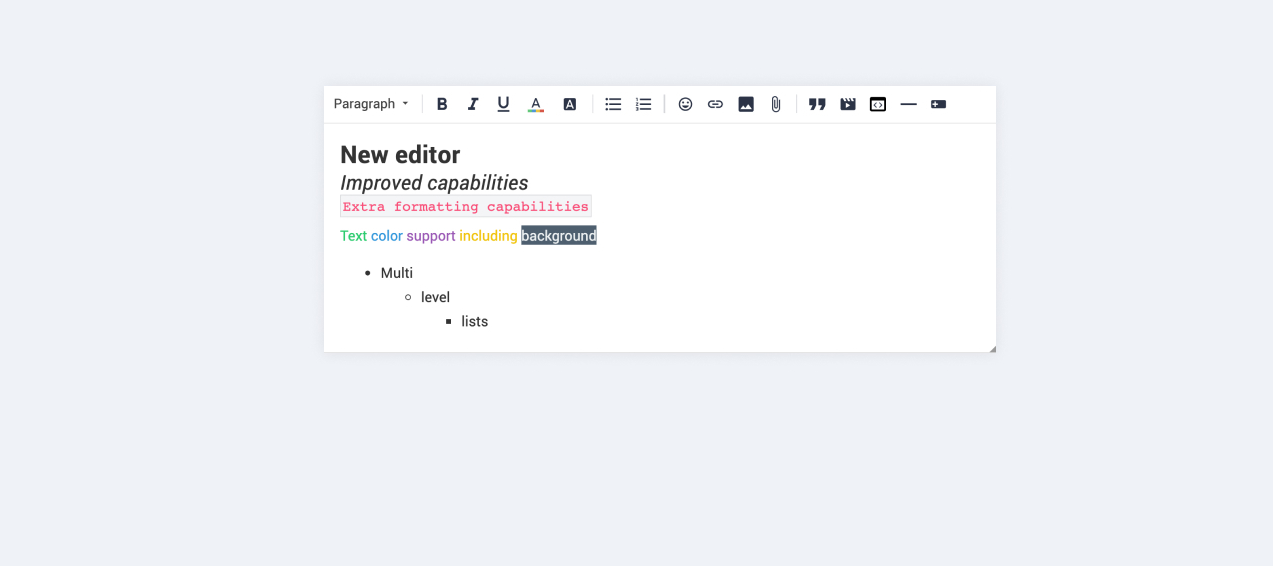
We are very proud to announce that our completely new editor is now available for all users on all communities! :grin::raised_hands::pencil2: We have invested a lot of time to give you and your users more options to create richer content in an easy way - so we hope that you will enjoy working with the new editor as much as we do!

We are investigating line-height / spacing inconsistencies as well as problems with selecting text on some viewports (e.g. Safari on iOS).

Polls are temporarily not available, but will be added again soon.

 Overview of improvements

There are many things which have improved with the new editor, just to name a few:

Improved existing features

  • Image upload
    • Drag & drop images into the editor instead of manual upload
    • Captions (descriptive text underneath uploaded images)
  • Code
    • In-line code is now possible (previously code was in an extra line)
    • Code syntax (code is not being stripped automatically anymore)
  • Lists
    • Multi-level lists are possible now
    • Better UX in working with lists (previously lists could not be interrupted by line breaks)
  • Text styling
    • Text styling within lists was not fully supported before

New features

  • Tables!
  • Callouts
  • Text color / background color
  • Horizontal lines

Of course not all of these features are available to end users, some of these (e.g. text color, header, callouts) are only available in the Control environment for now. We have plans to make this available to front-end users via user roles in the future, so that you are in control of who can make use of these features - please share your thoughts on this with us in the comments!

Feedback

Please let us know what you think of this improvement, also how your users are feeling about it. This way we can adjust and improve the editor even further in the future!

168 replies

LPortalupi
Helper ⭐️
November 12, 2019

It was my understanding this had been resolved, but maybe it hasn’t been – I just got an email notification about my own reply to a community member because I used the quote feature, which included his @mention of me:


This is the reply I posted that elicited the above email notification.
​​​​​​


Suvi Lehtovaara
Helper ⭐️⭐️
November 13, 2019

It was my understanding this had been resolved, but maybe it hasn’t been – I just got an email notification about my own reply to a community member because I used the quote feature, which included his @mention of me:


This is the reply I posted that elicited the above email notification.
​​​​​​


The same happened to me yesterday also @LPortalupi, so it seem’s that it’s not resolved :(

https://yhteiso.elisa.fi/
Ronald Posthumus
Contributor ⭐️⭐️⭐️
November 13, 2019

Feedback on previous posts

  • The new editor has 2 different scenarios as it comes to adding an image: 1) Insert image will directly show the image in the content and 2) Upload files will attach an image to the post. It is correct that you no longer can select an image from your hard-drive an both insert it into the text and attach it. We deliberately choose for the new set up as it makes more sense to choice up front wether you want to 1) insert a photo or 2) attach a photo


Hey @Yoeri , thanks for the update,


But this is exactly the issue that i'm addressing, because we don't want all users to add just any file to there post, we have not enabled attachments for users. At least, I'm guessing this is what you mean.

In other words, your ideal world would be where all users will have all those rights. But this also enables users to add all kinds of attachments to their posts, thus making it more work in moderating so no spam/trash gets on the community. I guess this can be just scared thinking on our part.

Is it correct to say that you then think this is a minimal problem? So we should just enable the ‘add attachments’ for all users?


Cheers,


Honest, open communication is the only street that leads us into the real world... - John Powell
Julian
JulianAuthor
Gainsight Employee ⭐️⭐️⭐️
November 13, 2019

Hi all,

I was out of office for a few days, but happy to take over from Yoeri here as far as it is possible. 🙂 Lot’s of things to catch up with, in case you miss an update on something please let me know!

@-mention in quotes

@Suvi Lehtovaara & @LPortalupi:

So I have shared your feedback that the initial fix of this issue is not working (in some cases?). My colleagues have created an investigation ticket to see what is wrong exactly, so that they can resolve this as soon as possible. Thanks for reporting this to us.

Attaching images vs. all attachments

I get your point, @Ronald Posthumus. Ideally, you would like permissions here to be more granular, so that you can choose e.g. to allow image attachment, but not support e.g. .pdf files.

I am not sure if I should judge if it is scared thinking on your behalf that allowing file attachments is a general risk, or if it results in more workload for Moderators. I personally don’t feel like it would be much work, at least i can say I don’t see much (or at all) abuse happening in connection with this feature. However I know that some companies are more strict with their privacy / security policy so they generally deny it.

Updating permissions to be more granular in this specific case I feel might take a bit longer, as we would have to first build a UI & settings to cater for this. I don’t think we can commit or share timelines as to when such an improvement could be done, as permission changes always have an impact and need extra time. However I generally would like to see you having more options regarding permissions in general!

So if I were you, I probably for now would test for the next month if your Moderators see any content they need to moderate after enabling file attachments (I don’t expect it). Alternatively, maybe it is a better option to have images for further information hidden inside a spoiler, so it does not obstruct the navigation within a thread too much?


Will follow up on other feedback asap! :)

I follow my nose, it always knows
Julian
JulianAuthor
Gainsight Employee ⭐️⭐️⭐️
November 13, 2019

Hey Julian,

I was away for a couple of days (not a good thing to do when these issues are running arround haha). The G letter is also showing on the Inspired Community when typing in ‘italic’. So its the same. I don't see the company font solving this, looks to be something else (using Chrome Versie 77.0.3865.120 Officiële build 64-bits)?

Thanks for the information, Ronald. In the meantime my doubt also grew as I saw this as well in quotes… I have opened an investigation to see why this is happening, hopefully it is a quick fix. Will update you once I have more info.


edit: what is weird is that i only see it in the editor window, not in the final post:


I follow my nose, it always knows
LPortalupi
Helper ⭐️
November 13, 2019

Feedback on previous posts

  • The new editor has 2 different scenarios as it comes to adding an image: 1) Insert image will directly show the image in the content and 2) Upload files will attach an image to the post. It is correct that you no longer can select an image from your hard-drive an both insert it into the text and attach it. We deliberately choose for the new set up as it makes more sense to choice up front wether you want to 1) insert a photo or 2) attach a photo
  • @LPortalupi have you tried to post an URL that does not include your primary domain (coursera) and see if that does open a new tab. The way this functionality behaves is that it looks at the domain name of your community and all links with the same structure will open in the same tab

This was the last update from my side for a short while as I will be out of office the coming time. If you have any questions, feedback and ideas still do not hesitate to let us know, my colleagues will be happy to help and support :)


Actually the links in that example post I linked to were bit.ly links, and they opened in the same tab. I just tested this with another post’s link to a different Coursera.org page and it opened in a new tab. This seems to be inconsistent; it doesn’t seem like expected behavior.


Hi @Julian, thanks so much for stepping in while Yoeri is away! I wonder if you could also make sure this issue is addressed. I’m happy to provide more info if needed (or file a support ticket) – I just don’t want this to be overlooked. Thank you!

Julian
JulianAuthor
Gainsight Employee ⭐️⭐️⭐️
November 14, 2019

Hey @LPortalupi!

Yes, I was already looking into it, but I was first not able to figure out the status of this. Luckily I have the right information now:

  • For replies, new questions, ideas and discussions, the behaviour described by Yoeri does apply: Same-domain links open in the same tab, while external domains open in a new one
  • For new articles however, there seems to be a small issue, where all links open in the same tab, regardless if same-domain or external

The team is already working on a fix - it seems to be related to the same cause of the issue that causes line breaks not to be displayed in the article preview (reported by you earlier). So hopefully both of these items will be fixed very soon! Will share it with you once I see that it has been resolved.

I follow my nose, it always knows
Julian
JulianAuthor
Gainsight Employee ⭐️⭐️⭐️
November 18, 2019

Hi all,

quick update from our side:

Custom fonts in editor

We have now fixed an issue where custom fonts were not displayed in the editor box, instead the default font was displayed.

Of course we are working on more improvements in the meantime, stay tuned for further updates.

I follow my nose, it always knows
LPortalupi
Helper ⭐️
November 19, 2019

Hi all,

quick update from our side:

Custom fonts in editor

We have now fixed an issue where custom fonts were not displayed in the editor box, instead the default font was displayed.

Of course we are working on more improvements in the meantime, stay tuned for further updates.

Hi @Julian. The font when typing a response in our community is extremely light – it’s not showing up in the same way as it appears in published posts. I’m guessing I need to do something on my end to fix this – could you please let me know what’s needed? Thank you.


Julian
JulianAuthor
Gainsight Employee ⭐️⭐️⭐️
November 20, 2019

Hey @LPortalupi,

thanks for raising this! I have spoken to my colleagues and they found a discrepancy in the setup of fonts - a different font version was used for both elements, hence the difference.

They have changed this now, so it should be fine now:

Please let me know if there is anything!

I follow my nose, it always knows