
Julian
Gainsight Employee ⭐️⭐️⭐️
October 14, 2019
FEATURE LAUNCH

Our new text editor is now available on all communities!
Related products:CC Community
  • October 14, 2019
  • 168 replies
  • 5350 views
Our new text editor is now available on all communities!

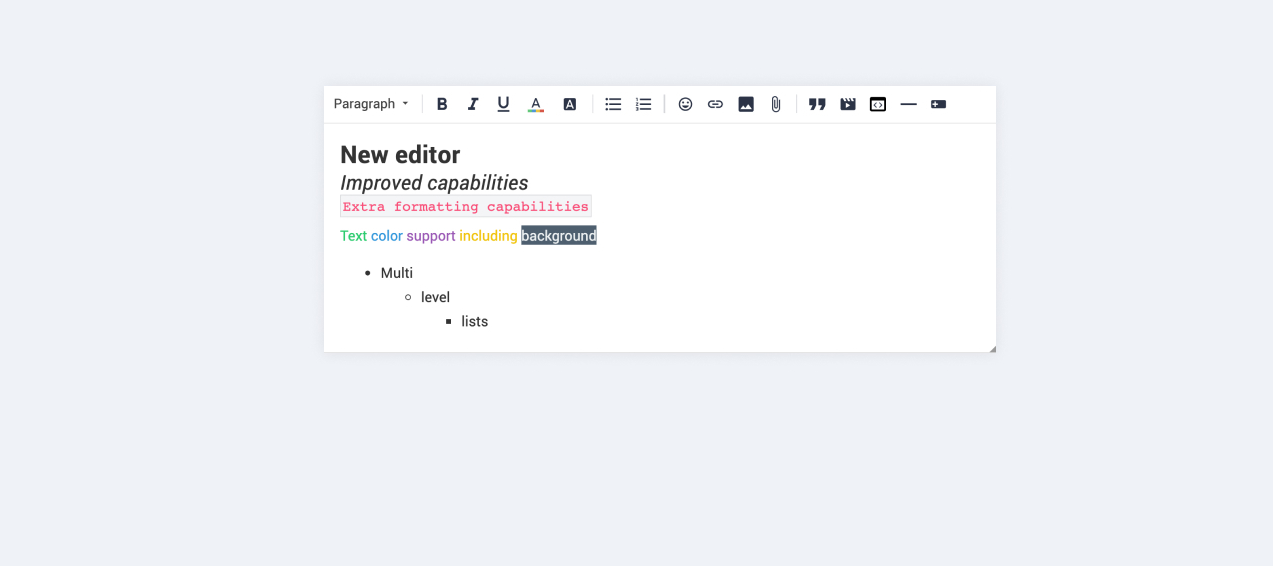
We are very proud to announce that our completely new editor is now available for all users on all communities! :grin::raised_hands::pencil2: We have invested a lot of time to give you and your users more options to create richer content in an easy way - so we hope that you will enjoy working with the new editor as much as we do!

We are investigating line-height / spacing inconsistencies as well as problems with selecting text on some viewports (e.g. Safari on iOS).

Polls are temporarily not available, but will be added again soon.

 Overview of improvements

There are many things which have improved with the new editor, just to name a few:

Improved existing features

  • Image upload
    • Drag & drop images into the editor instead of manual upload
    • Captions (descriptive text underneath uploaded images)
  • Code
    • In-line code is now possible (previously code was in an extra line)
    • Code syntax (code is not being stripped automatically anymore)
  • Lists
    • Multi-level lists are possible now
    • Better UX in working with lists (previously lists could not be interrupted by line breaks)
  • Text styling
    • Text styling within lists was not fully supported before

New features

  • Tables!
  • Callouts
  • Text color / background color
  • Horizontal lines

Of course not all of these features are available to end users, some of these (e.g. text color, header, callouts) are only available in the Control environment for now. We have plans to make this available to front-end users via user roles in the future, so that you are in control of who can make use of these features - please share your thoughts on this with us in the comments!

Feedback

Please let us know what you think of this improvement, also how your users are feeling about it. This way we can adjust and improve the editor even further in the future!

168 replies

David T-Mobile
Contributor ⭐️⭐️⭐️
October 18, 2019

Thanks for the update @Yoeri


Our Superuser Folkert just tested the spell checker, but it still doesn't work. Only gives options to copy/paste/cut: 


Ditte
Helper ⭐️⭐️
October 18, 2019

I’m hoping you’ll be rolling these fixes out in quick succession, as I’m starting to lose superuser activity over the fact that they can’t even write properly on our community.

Currently rocking the Sonos Communities
Yoeri
Gainsight Employee ⭐️⭐️⭐️
October 18, 2019

In order to see spelling suggestions you need to hold the ctrl/cmd key when right-clicking misspelled words. (I’ll update my original comment to make it more specific)


We’re looking into disabling the so called ‘contextual menu’ for cut/copy/paste. This will mean that your browser default pop-up (used for cut/copy/paste/spelling checks) will be restored on the regular right-click. Until that improvement is in place you can access this pop-up by holding the ctrl/cmd key when right-clicking a word or sentence

Group Product Manager, Customer Communities
bjoern_schulze
Helper ⭐️⭐️⭐️
October 21, 2019

In order to post gifs I was used to the following workflow:

  1. I find a gif and open it
  2. I right-click on it and choose “Copy image”
  3. I go to the community and into the editor
  4. I use CTRL-V to paste the image
  5. The gif is inserted and already runs

When I do this now, only a still image is being pasted instead of the gif.

Example:

I want to paste this GIF into my comment: https://thumbs.gfycat.com/FatherlyEnergeticKinkajou-size_restricted.gif

Here you go:


Suvi Lehtovaara
Helper ⭐️⭐️
October 21, 2019

Regarding the spell checker - our superuser noticed the following when typing a post on mobile.

If you select the misspelled word, the indicator is moved to the beginning of the post. This is annoying especially when posting longer comments / with several quotes.

This is me trying to demonstrate it, here.

https://yhteiso.elisa.fi/
Suvi Lehtovaara
Helper ⭐️⭐️
October 21, 2019

Regarding the spell checker - our superuser noticed the following when typing a post on mobile.

If you select the misspelled word, the indicator is moved to the beginning of the post. This is annoying especially when posting longer comments / with several quotes.

This is me trying to demonstrate it, here.


Oh, I just realised that maybe this is the same thing :point_down_tone2: ?

Priority lane

The following items are on our radar to enhance or fix first

  • Mobile behaviour for selecting, copy, cut and paste content
https://yhteiso.elisa.fi/
Julian
JulianAuthor
Gainsight Employee ⭐️⭐️⭐️
October 21, 2019

Hi all! :)

@bjoern_schulze thanks for reporting this - I have shared it with the team so that they can have a look at it!

@Suvi Lehtovaara I see this more as a general issue with the mobile view as an issue with the spell checker - of course this does not change the way we will treat this bug! 😉 I have reported it, thanks for providing the video!

Also, an update for @Jurgen: The problem with solutions not being displayed correctly (if the reply marked as the solution includes bold text) has been fixed!

I follow my nose, it always knows
Contributor ⭐️⭐️⭐️
October 21, 2019

Hi !

Superusers noticed that under Chromium, the corrector does not work even when doing CRTL + right click.


And on IE and Microsfort Edge, the corrector works only by right-clicking (without CTRL) :)

Julian
JulianAuthor
Gainsight Employee ⭐️⭐️⭐️
October 21, 2019

Thanks Marie, I will add it to the ticket regarding spell checking!

I follow my nose, it always knows
Jurgen
Helper ⭐️
October 22, 2019

Some new findings on mobile:

- You can’t easily cancel an automatic list (it seems to insist you use bullets)

- If you press the button to edit a post, you often jump to the wrong place in the browser. 

- The cursor seems to disappear if you exit a browser app and reopen it. Cursor disappearance happens randomly as well. 

- The ‘save’ button triggers the keyboard unnecessarily. 

(Tested on iPhone, multiple browsers)

From users

- Some bbcode, including images and colored text, doesn't seem to work. (Edit: this turns out to be intentional)

- Editing or replying to an @-mention causes it to be sent again.