dayn.johnson
VIP ⭐️⭐️⭐️⭐️⭐️
May 10, 2024
Released

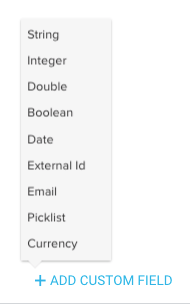
Dynamic JO needs additional data types if we are not allowed to do Custom Field Mapping.

Related products:CS Journey Orchestrator
  • May 10, 2024
  • 32 replies
  • 639 views

Title says it all. This issue (lack of Custom Field Mapping) was addressed in a post that’s hidden behind the private Dynamic JO beta group walls. It has not been solved, and it is (and will continue to be) a major pain point until a solution is implemented. @vmallya, is this something that’s on the roadmap to be re-released in dynamic JO, since the feature was present in advanced JO and was removed? Seems to be a pretty common use case.

When building case fields in the dynamic JO, we’re only allowed to choose from three data types (number, boolean, string). 
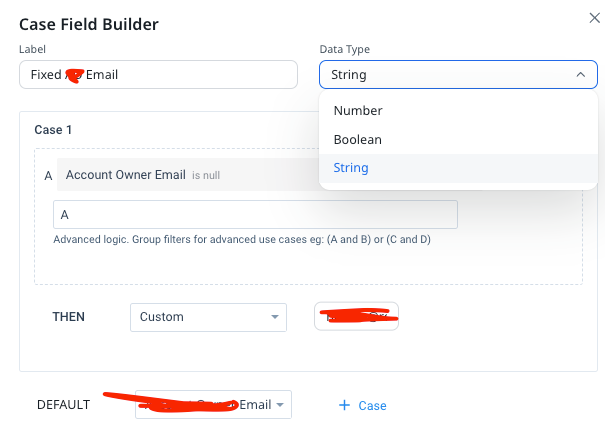


This becomes an issue when we then try to map those case fields to an email field in the template. Those fields (as strings) are only available in the name fields.
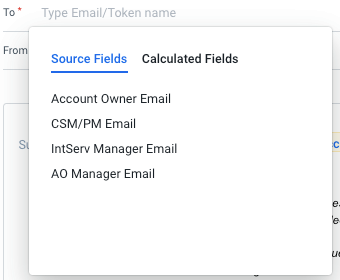
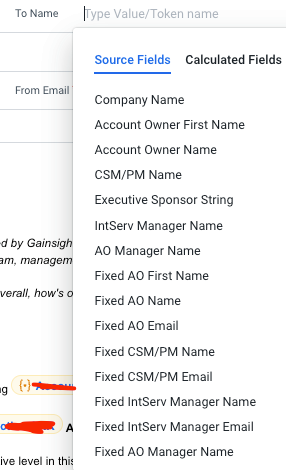


For comparison’s sake, in advanced JO, this was never an issue, since we were able to quickly map those strings to an email data type (or any other data type available in the Custom Field Mapping).
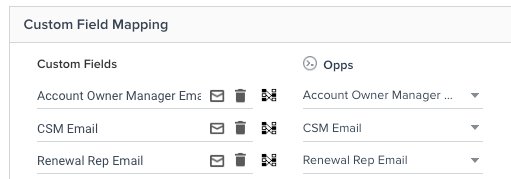


Would it be possible to add additional data types in the Dynamic JO Case Field Builder? This feels like we’re taking one step forward and two steps backward with this new release.

The workaround (I’ll report back once I’ve tried it) will be to re-source the email data and merge it with the case field to turn those case data strings back into an email data type.

* As a note, this workaround was presented in the aforementioned post that circulated in the private dynamic JO beta group (I’ll share the contents of that post in a comment below for reference), and the issue was marked as solved, but the fact that this is still such a big pain point (and that the feature was effectively hamstrung while working to improve the JO platform, even though it was addressed nine months ago) is concerning.

Bottom line: creating a case expression to fix a null email so an email doesn’t fail should be easy.

32 replies

vmallya
Gainsight Employee ⭐️
January 3, 2025

We sincerely appreciate your feedback on this thread and understand the ongoing sentiment. Our goal with the new version was to simplify processes in JO, ensuring that once you add a source, you wouldn’t have to do any additional work to utilize that data in the programs. We will be improving this further in the data prep process as we get the fundamentals in place.

@dayn.johnson please know that we are actively working on improving the quality of the existing features and starting in Q1, we will begin introducing query edits to live programs and continue implementing additional enhancements. We are also in the process of adding email data types to the case statements that would remove the need of creating custom fields in JO. 

@rrobinson regarding the migration, the underlying assumption is that all mapping data is linked to a source object/field, and those fields will be carried over to the new version along with the mapping metadata, including the data type. This will ensure that the data from the old versions is retained as is after the migration. However, we will thoroughly verify this during the migration solution scheduled for the end of this year.

Apologies for the late reply.


Vijay | PM | JO | Gainsight
waynedilworth
Contributor ⭐️⭐️⭐️⭐️⭐️
January 11, 2025

@vmallya - for Q1 2025 - will editing Live Dynamic Programs be limited to the Query - or can we edit further down the path - like evaluations and calculated fields?  We are developing multi-step digital programs using Dynamic, and one of our big concerns is the inability to apply lessons learned without Cloning and Changing which also means actively managing participants in multiple versions of JO Programs.  

Both of your statements to ​@dayn.johnson here are very exciting - email types are another challenge for us using Dynamic programs - where very few fields are showing up as selectable as Email addresses with no way to customize the field type in the current release.

Thanks to you and your team for pressing these much needed features!


dayn.johnson
VIP ⭐️⭐️⭐️⭐️⭐️
May 13, 2025

Updating with the full solution, since this is still an issue, 7 months later. Why make us do our mapping within the Data Designer or query, and remove a perfectly good and much loved feature that’s still a big part of our reason for sticking with the tried and true advanced JO?

Quick overview (screenshots below):

So this is the setup I've got (saved as a Data Designer TEMPLATE) for easier use in the future.

  • Transform with the case expressions (string text for custom email).
  • Union to force the string text to inherit the email data type from the master field, shows other fields beside the unified fields.
  • Not sure why the second transform was necessary, but it didn't work without it.

Took a LOT of experimentation to get this to work.

This is the key:

Unified fields inherit the properties of the master field (including the DATA TYPE), so in effect you're mapping the fields within the data designer itself. Not in the audience setup (which is possible with events and CSV source types). Labeling and descriptions are your friend here.

Key: unified fields inherit properties from the MASTER field, including the data type
Staff CS Content & Comms Manager, 2x Gainsight CS Ops Product Council Member
romihache
VIP ⭐️⭐️⭐️⭐️⭐️
May 14, 2025

Updating with the full solution, since this is still an issue, 7 months later. Why make us do our mapping within the Data Designer or query, and remove a perfectly good and much loved feature that’s still a big part of our reason for sticking with the tried and true advanced JO?

Quick overview (screenshots below):

So this is the setup I've got (saved as a Data Designer TEMPLATE) for easier use in the future.

  • Transform with the case expressions (string text for custom email).
  • Union to force the string text to inherit the email data type from the master field, shows other fields beside the unified fields.
  • Not sure why the second transform was necessary, but it didn't work without it.

Took a LOT of experimentation to get this to work.

This is the key:

Unified fields inherit the properties of the master field (including the DATA TYPE), so in effect you're mapping the fields within the data designer itself. Not in the audience setup (which is possible with events and CSV source types). Labeling and descriptions are your friend here.

Key: unified fields inherit properties from the MASTER field, including the data type


Crazy workaround! What a pity that we have do to all that to make it work, but it’s great to know that there is a way!! Thanks for sharing ​@dayn.johnson !

Continuous improvement is better than delayed perfection
saltamash
Helper ⭐️⭐️
June 4, 2025

Thanks Dayn! This is perfect.

But like you’ve already said.. this should be such an headache for an admin to accomplish especially since the product already had functionality to change the datastypes :( 

Jef Vanlaer
Helper ⭐️⭐️⭐️
June 25, 2025

@dayn.johnson Thanks for sharing; looks like I might just use the old programs for this kind of use case for now though...

dayn.johnson
VIP ⭐️⭐️⭐️⭐️⭐️
June 25, 2025

@dayn.johnson Looks like I might just use the old programs for this kind of use case for now...

@vmallya checking in approximately 5 months later – any update on whether we might be able to get custom field mapping for data designs and queries in dynamic JO?

While Advanced JO is still an option (for the time being) for those of us on older instances, we all know there’ll be a day when it won’t. Between not being able to map strings to email fields, the fact that we can’t add multiple queries, the inability to preview participant calculated fields… 

While it looks like some of these ideas are in discovery or development, it makes it very difficult to choose to launch a new program in Dynamic JO when Advanced JO makes it so much easier.

There’s so many good parts in Dynamic JO (Evaluate Criteria Before Action, Multiple Branches, Action Step Execution, etc.) — but if we can’t make it work without lengthy workarounds, adoption is hard.

Staff CS Content & Comms Manager, 2x Gainsight CS Ops Product Council Member
vmallya
Gainsight Employee ⭐️
June 26, 2025

@dayn.johnson and everyone here - we will be releasing the following in July, and you’ll receive the details soon. I’ll also update the other threads shortly

Preview in Evaluate


Email data type for Case Fields


Vijay | PM | JO | Gainsight
dayn.johnson
VIP ⭐️⭐️⭐️⭐️⭐️
June 27, 2025

Thank you ​@vmallya! These screen recordings look fantastic. 😀

Staff CS Content & Comms Manager, 2x Gainsight CS Ops Product Council Member
saltamash
Helper ⭐️⭐️
June 27, 2025


Thanks ​@vmallya