  • 475 Product updates

Coming soon: 'Theme' configuration mode

We’re taking the ‘Customization’ mode one step further and will soon introduce a new ‘Theme’ configuration mode. In this mode you can configure generic styles that are applied consistent with your entire platform, such as colors, buttons, fonts, card- and list styling and Custom CSS changes. Changing Cards in the new ‘Theme’ configuration mode  What to expect Theme configuration: A whole new mode in the community to allow you to easily change generic styles. You won’t need the Control environment to make changes anymore! Color configuration: Manage, edit and preview your color scheme Button configuration: Manage, edit and preview your buttons and their behaviour for various interaction states (default, hover, click) Font configuration: Manage, edit and preview your font-families Card configuration: Manage, edit and preview the look and feel of cards (used for quick-links, categories, featured topics etc) and their behaviour for various interaction states (default, hover, click). This has an impact on your existing card design: ‘Cards’ are used everywhere in the platform:  • Quicklinks • Featured topics • New featured topics • Events overview • Knowledge base widget • Category widget Currently the styling (title, text, border-radius, border-width, box-shadow etc.) of cards is not the same for all cards. We will align all cards elements and make sure they look and feel the same.    Custom CSS: Write custom CSS styling and directly preview the changes you wrote Blazing fast live-preview! Changes that you make can directly be previewed in the homepage. No more jumping back- and forth between Control and your Community layout.    When will the ‘Theme’ mode be available? You can expect the Theme mode to be launched later this April. We’ll inform you here via inSpired once it’s there.

inSpired ideation review Q1 2020

inSpired ideation review Q1 2020

The first quarter of the year has ended, and we wanted to share our first quarterly review to run through the great ideas on inSpired which we investigated, worked on, and delivered in the last quarter   The aim of the review is to highlight what’s changed on the inSided platform in the last quarter based on the ideas that you have submitted, voted for, and commented on. We also want to highlight prominent community ideas that are still on our radar. Some quick stats for inSpired ideas in Q1 12 ideas delivered 25 new ideas created 80 replies on the new ideas 99 votes on the new ideas A big thank you to everyone on inSpired who has shared ideas and voted on other customer ideas - the product team really values the insights and feedback you’ve given us over the last quarter    Ideas we delivered We’re happy to share that the following 11 ideas you submitted on inSpired have been delivered, with a total of 121 votes delivered in Q1 2020. 🎉 Allow users to search for all topics containing the same public tagSubmitted by @LPortalupi  Extend community search functionalitySubmitted by @bjoern_schulze  When mentioned in a new comment, only send one notificationSubmitted by @Jurgen  Changing the order of featured topicsSubmitted by @Monique  Assigning a point value to the leaderboardSubmitted by @ChrisPantelis  Schedule an article to be published on a specific daySubmitted by @tomasmouton  Add Preview to draft page to see how unpublished content will look once publishedSubmitted by @freydrew  Content Type "Event"Submitted by @bjoern_schulze  Zapier trigger: New User Registration Submitted by @James Scott  Assigning a post to a moderator should trigger an email notification Submitted by @lila_meyer  Pinned replies Submitted by @Rudi  Partially delivered We also worked on the following 2 ideas and provided parts of the idea or delivered a solution that allows you to achieve the same result: JIRA integrationSubmitted by @Keith M  Members Dashboard: New functionalities to add value to analyticsSubmitted by @bjoern_schulze  Most popular ideas (open/recently delivered) Here’s a quick update on the most popular open and recently delivered ideas (sorted by votes) on inSpired. 1. Schedule an article to be published on a specific day (46 votes / 🚀 Delivered) After we delivered manually awarding badges, this was the next top idea on inSpired. We shipped this last quarter (check the announcement for more details) - we hope you’re finding this feature useful - we find it very handy on the inSpired team as well! 2. Front-end moderation by users (31 votes / Open) We have discussed this idea again but don’t have any concrete plans to work on this. Our current priorities for moderation improvements lay with improving the workflow and ease of use for moderators in Control. Watch this space! 3. Private Messages: Enable attachments (30 votes / Open) We did a technical investigation for this and came to the following conclusion: Attaching images to a private message is complex and requires significant development investment to achieve. This is because the attachment service (for topics and replies) is connected to topics, and can’t easily be reused in private messages. We do not have any concrete plans to work on this. 4. We should be able to include images/pictures in pms (28 votes / Open) Much related to enabling attachments for private messages: We invested some time and resources to build an internal proof of concept around this idea. Based on the learnings from the proof of concept, we decided to postpone the realisation of this idea as we wanted to invest in other product capabilities and improvements in the last quarter. At this point we don’t know when we will be working on this idea (again).    5. Sent and deliver rate of notifications (27 votes / Open) We don’t have any concrete plans to work on this at the moment. It’s something we might consider looking into as we invest further in this area of the platform. 6. Block offensive words when creating threads (26 votes / Open) This is something we will investigate this quarter, but we’re not yet able to commit on a concrete time for how or when we’ll deliver this. 7. Ability to move subforum to another category (24 votes / Open) We plan to tackle this very soon - make sure you’re subscribed to the idea for updates! 8. Changing the order of featured topics (23 votes / 🚀 Delivered) We delivered this idea this quarter together with the release of the new homepage configuration experience. We developed a new brand new featured topics widget with some new perks: Drag & drop reorder topics in whatever way you want Feature an unlimited amount of topics Determine if topics should display as a large or small card Add a title above the topics (optional) Add a call to action button below the topics (optional) What’s next? You can expect more updates on your ideas as we are currently working our way to review all the open ideas here on inSpired. This also means that we will be closing more ideas, most likely because: We don’t see much demand, It doesn’t fit our vision Or we want to improve something in a different way. We are also looking into new ideas which we can implement in the future. These ideas will be marked as ‘under construction’ when we are actively working on them and will be communicated via the roadmap updates. For instance, this coming quarter, we’ll be paying particular attention to ideas that improve moderator quality of life. If you have any feedback, ideas (see what we did there? 😉) or thoughts around our ideation process please share them with us, and help us build a better product!

Related products:CC Others
New topic list view coming soon

New topic list view coming soon

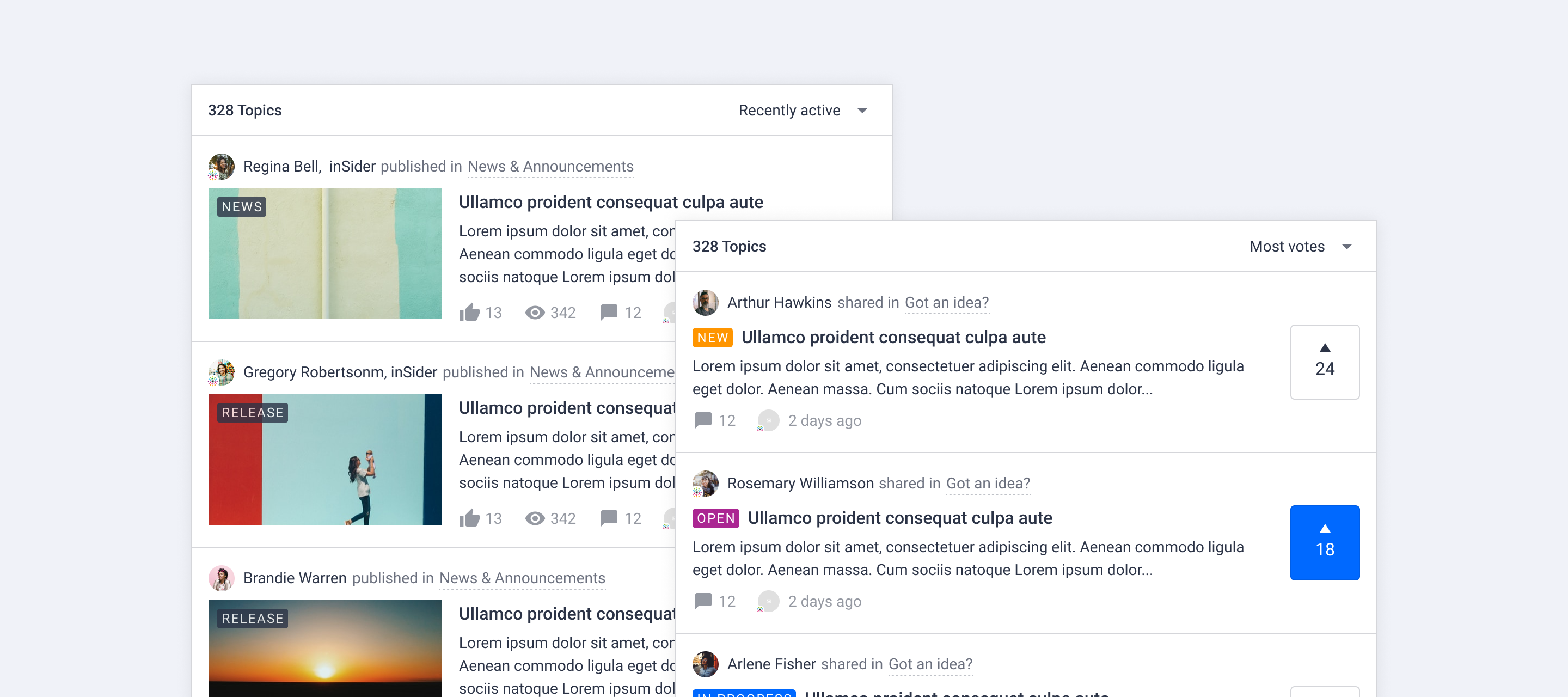
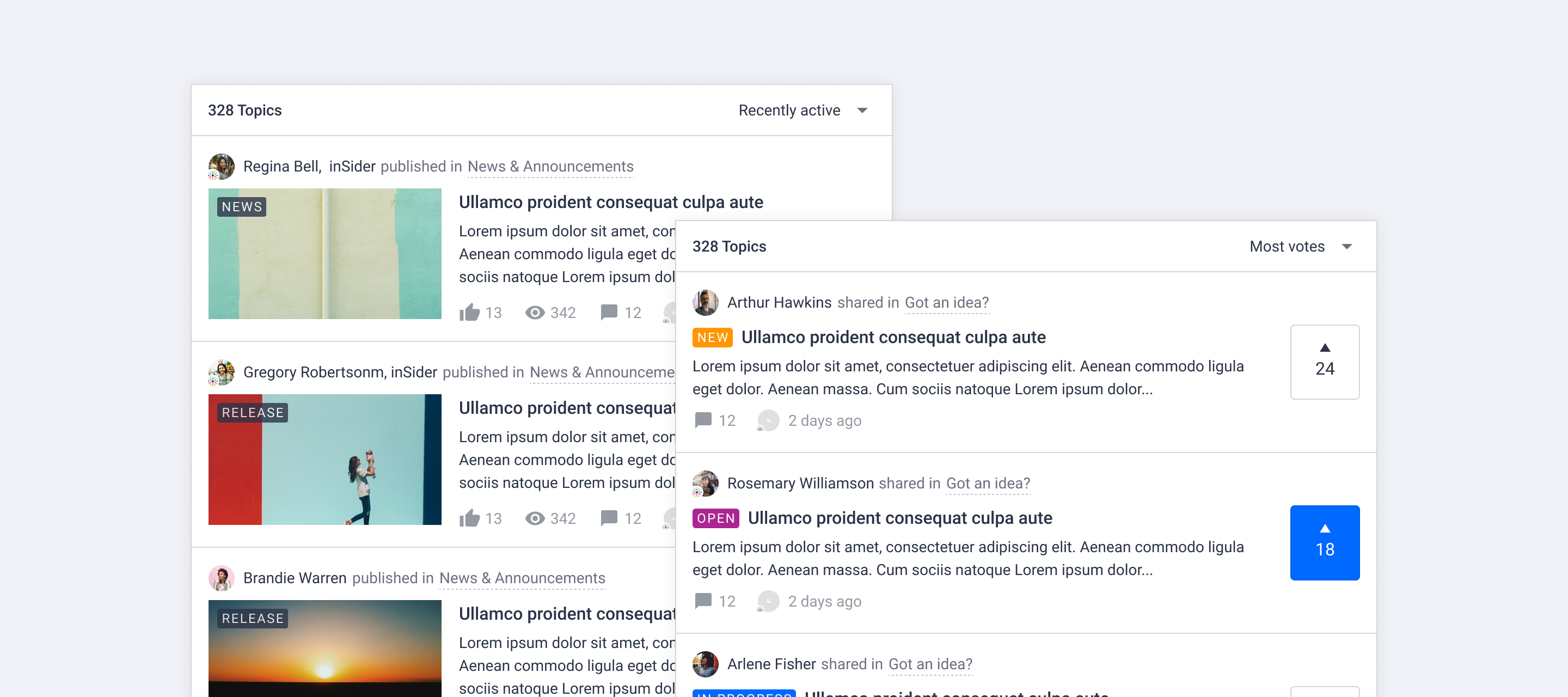
For quite some time we have been thinking about changing the way we display a list of topics. Together with you we’ve brainstormed about changes, improvements and created various mockups. Our goal is to make the user experience more consistent across the platform, distinguish different content types visually and make content easier to scan.  The topic InSide Design: Topic list by @xiaoyu-shen  gives more insights into our thought process and the way we approached this. In this topic you will learn what is going to change for the topic list view and what other design changes we’ll be rolling out to your communities over time. Update April 21: Changes mention in this topic are now available!   New topic list view We made some general changes to all topics cards and some specific changes for ideas and articles. Click Learn more! below to see a visual overview of the new topic card design:     General layout changes Smaller author avatar Change the color of user name from brand color to text color (will be overwritten by rank username styling) Display category info next to author, parent category is now shown Distinguish the content types using different verbs next to author information Amount of views are only displayed on desktop for articles Subtle hover effect for metadata Upgraded article card in topic list Remove border around image and content Show content right below the title Show label on image if there is a featured image Upgraded idea card in topic list Highlight the vote action as well as the amount of votes Improve idea status visibility using status label   Where would this new topic list design apply to?All pages with topic lists will be affected: For example, home page, community (parent) category page, search results, recently active topics, answered questions, etc. Note: topic lists in knowledge base categories will not be updated.   When will these changes be available? Update April 21: Changes mention in this topic are now available! We expect to enable the new topic list view Tuesday April 21 around 13:00 Amsterdam time (UTC/GMT +2 hours). We’ll notify you via inSpired when the new topic list view is available. We are working on more visual improvements and a new way to change generic styles (colors, cards, fonts, buttons, lists) in your platform. Stay tuned for more!

Excluding search and member pages via Robots.txt

We shipped some improvements to the Robots.txt file based on your feedback. The Robots.txt file helps you to tell Search Engines what content you would like to have be made available in their search results, and what content you would like to remain hidden. Note: This update will not be applied if you have already configured your Robots.txt file When we first delivered the possibility to set up a Robots.txt file it was empty. It was your responsibility to update and maintain this file (often a one-time setup). Now, in case your Robots.txt is empty, we’ve pre filled this file with some generic rules to exclude some community pages from being crawled.   What did we change to your Robots.txt We added the following generic rules (only if your Robots.txt file was not configured before). We advise everybody to add these rules to their Robots.txt file if they haven’t done so: Disallow: /members/Disallow: ?userid=Disallow: ?sort=Disallow: search_type=tagDisallow: search?q=   Why did we do this? By disallowing the pages above we tell search engines to not crawl them, eventually leading to them not being indexed anymore. The other pages of your platform, that hold importent content and information, will get more value and rank better in search engines. In the end it will be easier for the user to get to right information they are looking for from their favourite search engine.   How can I change my Robots.txt If you want to make changes to your Robots.txt or revert the update we pushed you can follow this guide to configure your own Robots.txt file: Setting up a Robots.txt file

Making your community work harder for you during challenging times

Making your community work harder for you during challenging times

Challenging times at the moment, guys, and I hope you’re all staying well. How is the situation affecting your business and daily work?  We’re seeing that some companies are struggling because their support teams are understaffed, and their support requests are increasing.  We wanted to put together a few quick ideas for you that might help make community management life a little easier in the coming weeks…   Direct support enquiries to your community If you’re sending out communications to your customer base detailing any temporary changes to your operations or service provisions, consider recommending that customers visit your community to get any further questions answered, and reduce the pressure your support team is no doubt feeling right now.    Here’s GiffGaff doing a great job of it:    Community under pressure too? Consider recruiting some extra super users  If you’re in an affected industry (I’m looking at you, telco!) then your community is no doubt also under some additional pressure and experiencing elevated activity with users discussing and asking questions relating to the current situation. Consider recruiting a few additional super users to help you through this period—if you already had your eye on new potential super users, now is the time to cut the red tape and get them on board and offering you some much-needed moderation support.   Highlight relevant knowledge base content Make use of the features available on your community to highlight news or update content  related to how the Coronavirus outbreak may impact your customers. If you’re taking special measures, implementing temporary changes to plans or accounts to assist users, or simply have your operations affected in any way, this is a great way to make sure worried customers get the info they need in a couple of easy clicks. You could consider temporarily adding new Quick Links or re-arranging them to make sure pandemic-related content is easy to find.    Good job O2!    Coursera have used the Featured Topic feature to draw attention to their COVID-19 related content How else are you guys making the most of the platform’s functionality to help you through right now? Please do share it with us as I’m sure all fellow community managers will be happy to receive any tips!   Stay well. ​

Related products:CC Community
Roadmap Update #16

Roadmap Update #16

Here we are, nearing the end of Q1 2020 and what a strange and difficult situation we all find ourselves in. The whole team here at inSided hopes that you, your family, friends and colleagues are coping as well as possible with the current situation! How about a welcome break with our latest Roadmap Update? ☕ We’ve got some great new releases we’re excited to share with you all, including:  The all-new Homepage configuration: this is a huge step to help you optimize for your various different use cases and custom styles We’re extremely proud to have delivered so many ideas from you—our beloved community!  We’re looking forward to helping you all bring your offline communities online, with user groups and events (more below) — especially now.  Here’s a quick look at our releases since the previous update: Bring your community together online with our new Events module Never lose a change with article versioning Publish perfectly-formatted articles with (shareable!) article previews Brand-new menu in Control Hide ‘old’ content in the Embeddable Widget Publish content even whilst you’re on holiday, with Article Scheduling Target the competitive spirit of your members with a points-based leaderboard Change your community homepage layout design with the all new customization mode New category type 'News' now available A whole new search experience: Instant search and search filters Dashboard improvement: save filters as bookmarks Get a 360° view of your customers with our Salesforce CRM integration Use text- and background color in the editor Embed Miro boards into topics Platform email improvements  Coming up: What we’re working on:   Groups Engage with like-minded community users who are passionate about the same interest, industry or role Create and manage public or private groups from Control View and manage group members, see who is part of your group, accept or deny new members and remove members who misbehave Your community members can browse public- and private groups. Join a group, see its members and post new topics and replies to it Customization improvements Following up the Customization mode we’ll continue working on improving and expanding the capabilities of the customization mode. As part of these improvements you can expect new homepage widgets, a new topic list view and more general design improvements. Personalization We will start investigating how we can serve more relevant (personalized) content to a segment of users. If you have any ideas or thoughts on this subject, send a private message to @Yoeri as we would love to hear your feedback on this subject. Salesforce Federated search We’re building an integration with Salesforce to search for Knowledge base content through your inSided community platform View Salesforce knowledge base articles in your community live-search and search result pages Salesforce Support Case Escalation We’ll provide you with the ability to create Salesforce cases from community posts directly in Control. This makes it really easy to notify your support team, and give them quick context on issues customers raise on the community that can’t be handled by other customers, or the community team. Tag management We’re going to give you a better way to manage the tags users can create on the community, with the outcome of making tags more useful for your users to find relevant content around a subject on the community. This includes a way to manage tags in Control (create, edit, delete), and a way to prevent users from adding tags on the fly (as well as a way to suggest tags from the ‘official’ list). Ideation workflow We’re looking into ways of making it easier for you to manage your ideation processes on the community, whether it’s highlighting the latest official response to an idea, or closing the loop in a more effective way with all customers interested in the idea. So with all that said, we’re looking forward to continuing our momentum into next quarter and bringing you even more rich features and functionality. Let us know here on inSpired what your focus is right now and how you’re utilizing your community to help you through this challenging period. Until the next update, stay well! 

Related products:CC Others
📆 Bring your community together online with our new Events module

📆 Bring your community together online with our new Events module

Events are all about community, whether you’re hosting an online webinar, running your yearly conference, or arranging a local meet-up for your community members. As we see more and more in-person events being cancelled in the wake of the Coronavirus (COVID-19), getting your community together online and keeping them engaged has never been more important. That's why we want to make it as easy as possible for you to publish and promote events on your community. Not only is this a great way to keep your users engaged, it allows you to measurably prove the value of your community platform within your organization. By putting your online community at the center of the event experience you facilitate knowledge sharing between community and ensure the conversation around your event goes on long after it’s finished.   Thanks to @bjoern_schulze for suggesting Content Type: “Event” as an idea on inSpired! With events you can: Help community users discover events via the community with brand-new events widgets for the homepage and an overview page with upcoming and past events.  Boost interest and signups with event RSVPs (you can even use our platform as an end-to-end event management tool for more informal events).  Increase community engagement by promoting featured topics to encourage meaningful conversations before and after your event takes place. We’ve prepared a whole new suite of documentation to help you navigate the new events feature - learn more in our events knowledge base. Events functionality is also available via our API - see our API documentation for more details. Let us know what you think of the new events module in the replies - we’re excited to hear whether you like it, and any feedback you have so we can improve it further.

Related products:CC Events
🎬 Never lose a change with article versioning
🖼️🤩 Publish perfectly-formatted articles with (shareable!) article previews

🖼️🤩 Publish perfectly-formatted articles with (shareable!) article previews

I’m happy to say that we’ve released yet another inSpired idea: article previews. Thanks to @freydrew for submitting the original idea on inSpired! No one likes their formatting to turn out differently than expected. We have a powerful WYSIWYG editor for creating articles, but we heard feedback from you that sometimes things were a little bit off for your community readers after you published the article. For instance, the spacing between lines was different. And the font is different… Or you published the article in a hidden category on the community to share with your boss/colleagues. No need for hidden categories anymore - we’ve introduced a new preview option for article drafts! What’s even cooler is that you can optionally change the sharing settings to share previews with colleagues who don’t even have access to Control.With article previews you can:  See a 100% accurate preview of what your published article content will look like on the community. Give Control colleagues quick access to a preview of your article. Share article previews with colleagues who don’t have access to Control. We hope this helps you publish articles with less stress and higher quality! Some proof that it works: Spot the difference, oh wait, there is none! Well - maybe there are some differences in this particular article...50 bonus points on inSpired for the first customer who calls out any difference between the article content in this screenshot vs what you’re currently reading.Two things to keep in mind: we don’t currently include previews of file attachments, and the sharing functionality ‘Anyone who has the preview link’ is not supported on communities with platform visibility set to private. Let us know what you think of the new article preview feature in the replies - we’re excited to hear whether you like it, and any feedback you have so we can improve it further.

Related products:
Advance notice: brand-new menu in Control

Advance notice: brand-new menu in Control

Update Thursday 12 March 17:45: We’ve successfully completed the rollout of the new Control menu  Please leave any feedback in the replies, especially ​if you spot something we can improve, or for example if any navigation within Control has become more (or less!) frustrating :)   We plan to launch a new menu in Control next Thursday 12 March 2020 . In this topic you can find all the information you need to be prepared for the launch, so you and your team can hit the ground running with the new menu. Note: this is a visual/UI update; permission settings will remain the same, although some pages will change location. As we previewed last week in our product research category, we have revamped the login page for Control and we’re working on a brand-new menu. We’re getting ready to deliver this menu to all of your Control environments. Our main goals with this update are to: Maximise the space available in Control to help you focus on your work Make the interface of Control match the inSided brand more closely Make Control a more beautiful place to spend time in Highlights of the changes: No more header in Control - another way we’re giving you more space to focus on your work. An optionally collapsible secondary menu, to give you more room to focus on your current task. Some restructuring of the menu layout, taking into account our switch to icons in the primary side menu. A new button to quickly take you to the homepage of your community. For more information, check out this GIF walking through the new Control navigation in detail. (Updated Wed 11 March: seems our platform doesn’t like my GIF tool, so changed it to a link). Please let us know if you have any questions!

Related products:CC Moderation
🏖️ Publish content even whilst you're on holiday, with article scheduling
🥇🥈🥉 Target the competitive spirit of your members with a points-based leaderboard
Our new homepage is live! Find out what's new (and why)

Our new homepage is live! Find out what's new (and why)

We are thrilled to announce that our inSpired homepage has been completely re-designed and is available to all of you now! This is connected to our freshly-launched homepage customization tool which is available for you as well!   What’s new Next to an updated banner and other visual improvements, we have added some new widgets & improved existing elements within the homepage. Here the complete change log: Removed border of header, navigation and community statistics bar Updated category thumbnails (and hero banner) Added parent-category navigation cards Updated the quicklinks Added new featured topics widget Updated recommended content widget Changed community category cards order (to start with “recently active”) Added sidebar widget on homepage, (parent-)category page & topic page Added quicklinks at the bottom of the page   Why did we do these changes There are a number of reasons why we did these changes the way we did them. Not just that we regularly review the homepage to reflect latest product improvements and to enhance the navigation experience. We of course also want to show what’s possible with the new homepage customization feature. We hope that you like it and also find something now that you can adapt on your own community homepage! Tip: Learn how to get the most out of your own homepage by checking out our guide on best practices!   Your feedback Of course we are curious to hear from you if you like it, or if you are missing something! Let us know in the comments!

Now available: News – new community category type

We added a new type of category that you can add to your community, meet News. This category type can best be described as a communication and information sending category as your company has full control over its contents. Characteristics Only moderators, community managers and administrators can create topics in this category The default sorting order of this category is set to ‘Newest first’ - this will sort the list after latest published content and not after latest activity (this excludes sticky topics which will always be on the top) Registered users and super users can not post topics in this category, if you want to add a topic of your user to this category you can do so by moving the topic in the Control environment Example usecases Here are some examples on how and when to use a news category For official updates from your company For product release notes and changes (like we do here in the ‘News & platform updates’ category on inSpired) For your company blogposts that contain roundups, inspiration and interviews Create a news category Creating a news category, or converting a default category to a news category, is a piece of cake: Go to Control > Platform > Community and either add a new category, or edit an existing one. Category type: NewsOver time we will make changes to the UI of this News category (much like ideation and knowledge base categories have a different UI) and to the way topics are being displayed in the topic lists. We hope you like this new category type and we look forward to see it in action in your communities, if you have a great use case please do share it with us in the comments below.

Change your community homepage layout

Change your community homepage layout

Get ready to (re)design your community homepage. We have rebuilt the homepage design experience from scratch. Adjust the look and feel of your homepage with just a few clicks. No coding required!     What can I do with this feature? Add, edit and delete homepage widgets while directly previewing your homepage Place homepage widgets in whatever order you like! Preview (design) changes before publishing Use brand new widgets like: featured topic cards, community navigation cards, leaderboard, container, HTML widget(s) What is new?   Customization modeA whole new mode to allow you to easily change your homepage layout. Guess what? You won’t need the Control environment to make changes to your homepage anymore!  Live previewPreview changes that you make directly. No more jumping back- and forth between Control and your Community layout. Reorder widgetsTake full control over the position of your homepage widgets. Place important topics on the top of your homepage, above the fold, or place a list of recommended topics right above your footer. Widget libraryPick homepage widgets that suit your business. Choose from a wide range of widget types like: navigation, topic, promotion, sidebar, custom code Go full-widthNot a fan of the sidebar? Remove it and apply a full-width design on your homepage Featured topics (widget)We improved the featured topics design and added some extras. Add a title and button to the featured topics panel. Point base leaderboard (widget)Display a point based list of valuable community members based on their engagement levels. Community cards (widget)Promote community parent categories as navigation cards, there are 2 different templates that you can pick.   How to get started   Simply sign in to a community account with user role Community Manager or Administrator. Go to the homepage and click the nice purple ‘Customize’ button. Of course, we also added some guides and how-to’s to help you get started:  Getting started with the homepage design A closer look at homepage widgets Set up quick links on your Homepage Feature topics on your Homepage Set up community and knowledge base navigation Add custom widgets to your homepage with HTML&CSS Enjoy!

Now available: Instant search and search filters

Now available: Instant search and search filters

Instant search and search filters are now available on your communities! As of now you will be able to narrow down search results and perform more specific search queries with the help of filters. We replaced the old search result page with a new page that includes a bunch of new and improved functionality. Can’t wait to see how it looks like and works? View the new search page: https://community.insided.com/search In some edge cases the total topic counter may not reflect the counter in the filters, we are aware and are looking into these inconsistencies What’s new Category search - searching in a category page will only show results from that specific category Instant search - the list of search results will automatically refresh after some time as you type in a search result page Endless scroll - when you reach the bottom of the list of result we’ll automatically load a new set of results Search filters - we added search filters to the search result pages that will allow you to filter on: Source Community (shows all topics posted to community categories) inSided Knowledge base (shows all topics posted to inSided knowledge base categories) External Knowledge base* (shows all topics from an external Knowledge base like Zendesk or Salesforce) Knowledge base categories Filter topics by knowledge base parent- and child categories Community categories Filter topics by community parent- and child categories Topic type Filter topics by article, idea, conversation, question Public tag Filter topics by one or more public tags *Only visible when you have set up a Federated search integration with an external knowledge base Thank you; We’d like to thank everybody who helped us testing and providing feedback. We were able to include some of your feedback and fix inconsistencies. Thanks! 

Dashboard improvement: Save filters as bookmarks

In the course of improving the dashboard experience, we have added a new feature which allows you to save the filters you have activated as a bookmark. We hope this will save you time and effort when pulling your weekly/monthly reports from the dashboards. This improvement is based on feedback from this idea, following up on our recent ideation review. What’s new Once you have selected all the filters that you are interested in you can save them for later. Simply click on the small icon at the top and choose a name for it.     Some tips for working with this feature Remove the date filter before saving, unless you only want to check for a certain date range All saved filters are available across all Dashboards - no matter where you add them Be as specific as possible in the description to find back a saved filter more easily They are ordered by the way they have been saved - your last saved filter will be at the bottom of the list Deleting or editing filters is not possible at the moment. We believe this feature in its current state will already make your reporting job easier with the dashboards, and wanted to deliver it to you as fast as possible, so we haven't included a full array of options just yet. Your feedback We are curious to hear your feedback on this feature. Do you find this helpful? Is there something you are missing? Or is there something not working as expected? Let us know in the comments! What’s next? In the meantime, we are already working on implementing more ideas from our community. Make sure to upvote or create ideas so we know that you’d like us to work on it.  

Related products:CC Analytics & Reporting
Get a 360° view of your customers with our Salesforce CRM integration

Get a 360° view of your customers with our Salesforce CRM integration

We’re happy to announce that our integration with Salesforce is now available in the inSided Control environment with self-service set up. Our Salesforce integration enables you to push community member and activity data to Salesforce to gain a 360° degree view of your customers—providing you with richer data that helps prove the worth of the community to the rest of your business. What can you do with this integration?    Get a 360° view of every customer’s community activity, making sure you’ve always got the full context easily to hand when communicating with customers.    Understand the reach of your community and see how it’s been adopted by your customer base, as well as which customer segments you can target to improve community membership and results.    Get insights about the engagement levels across your customer base, and easily spot any accounts that have dropped in activity—so you can take proactive action.    Provide better context for your product team on customer ideation, by identifying which ideas are most popular amongst different customer segments (you can even link ideas to account ARR!). For more inspiration on how to get the most out of this integration, check out our eBook: Unlock your Community Data — Integrate inSided with Salesforce. ​​​ The Salesforce CRM integration is included in our Enterprise package. If you’re not on our Enterprise package, you’ll see a card in Control directing you to contact your CSM or Support to learn more. Installing the Salesforce CRM integration Follow our setup guide with your Salesforce Admin to get the integration set up (time to set up is just under 30 minutes!). This guide also provides more details about how exactly the integration works, and exactly what community data you can pull into Salesforce. We’re really excited to bring you this integration and are confident that it will help deliver a lot of community value for the Salesforce users out there! As always, please let us know in the replies if you have any questions or feedback.

Related products:CC Integrations