  • 475 Product updates

Now available: Robots.txt file

Now available: Robots.txt file

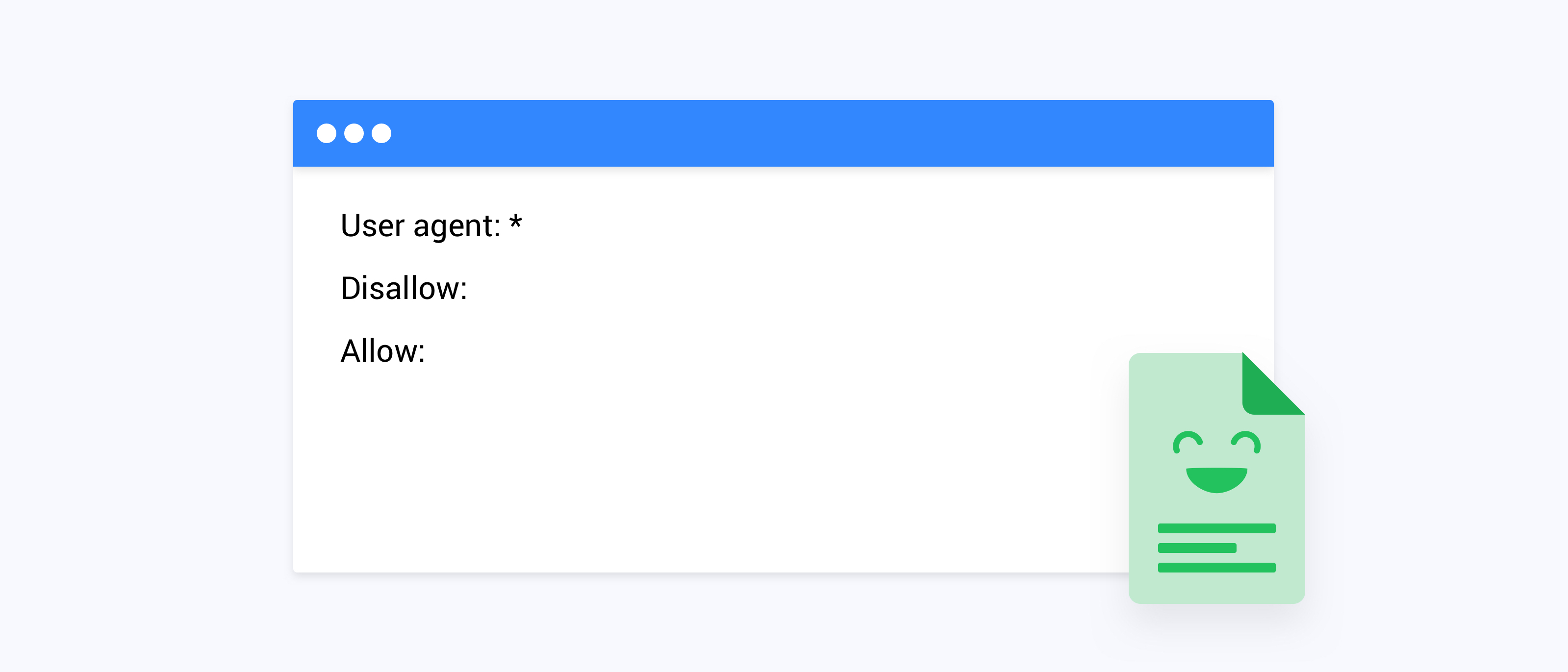
Ugh, Robots…! They can do anything, are taking over the most mundane tasks and worst of all: they are scanning my platform! We have received a lot of feedback via inSpired, support and the CSM team that you want to be able to control the search-engine crawlers. We listened: As of today we’re happy to introduce the Robot Exclusion Protocol (historic name), or as it’s more commonly known: a robots.txt file for your platform! What is a Robots.txt file?First introduced as far back as 1994, the Robots.txt file was created as a solution to keep badly-written crawlers or search engines away from your content. Moving on to present times, it’s a pretty standard way to tell Search Engines what content you would like to have be made available in their search results, and what content you would like to remain hidden. What can I do with a Robots.txt file?With this file you can tell search engines how to crawl and index the content of your platform, you can configure the following settings in Control: Write crawl and index guidelines for (specific) user-agents Tell user-agents (Search Engines) which content they are allowed to crawl and index (allow) and which they can not crawl and index (disallow) Link to a hosted XML sitemap. FAQQ: How do I setup a Robots.txt file for my platform A: Read this guide to get started: How To Setup a Robots.txt file Q: Where can I see the Robots.txt file in Control A: This feature is available to Administrators and can be found in Control > System Configuration > Robots.txt Q: I don’t have a Robots.txt file. Will search engines still crawl my platform A: Yes. If search engines can’t find a Robots.txt file they assume there will be no guidelines and they will crawl your entire platform. Q: Which search engines support a Robots.txt file A: Google, Bing, Yahoo, DuckDuckGo, Yandex, Baidu Q: What can I do with a sitemap A: Sitemaps tell search engines which content is available and where to find it. Although it’s a different functionality it is sometimes pointed to in the Robots.txt file. We don’t offer the functionality to create an XML sitemap inside our platform, but if you created an XML sitemap yourself you can use the Robots.txt file to link to it. Q: Can I link to sitemaps A: Yes. Make sure you point to an absolute URL and your sitemap is an .xml format. e.g. https://www.example.com/sitemap1.xml

Parent categories – Launching April 2, 2019

Parent categories – Launching April 2, 2019

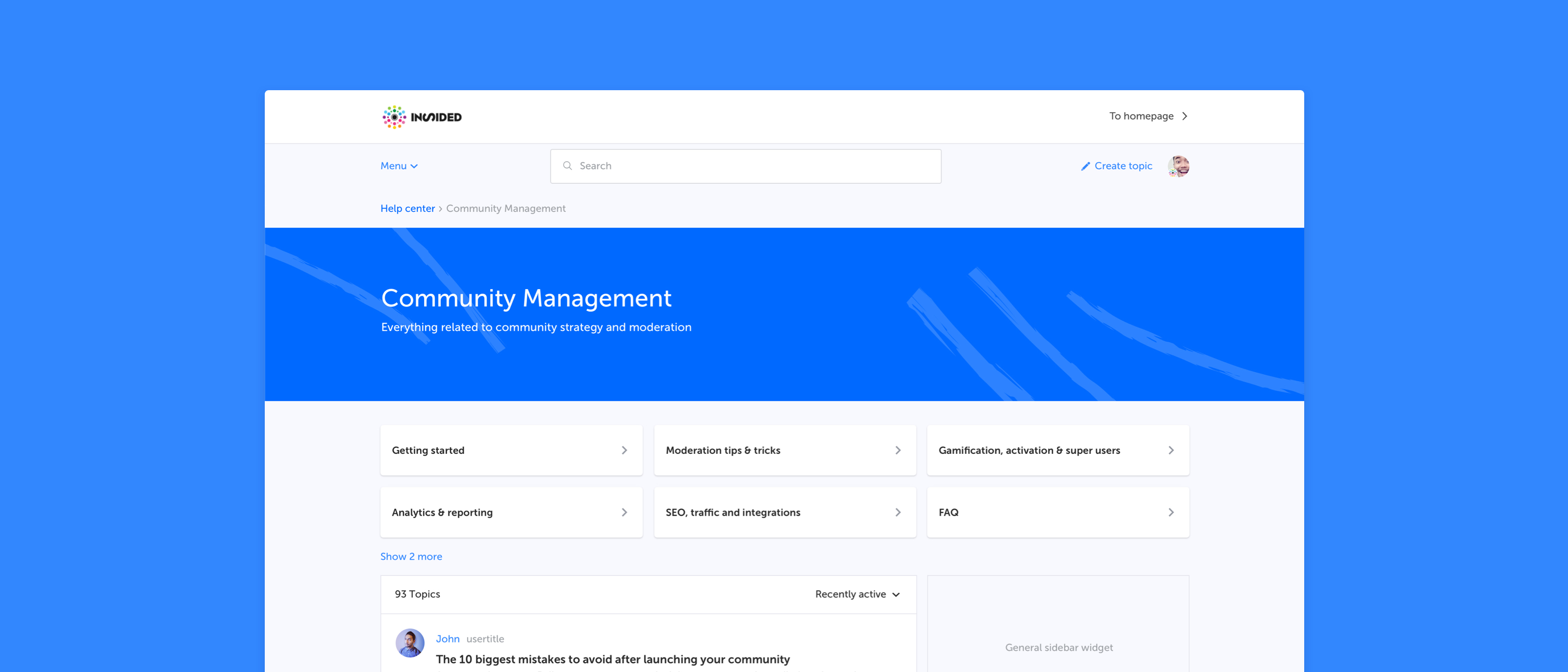
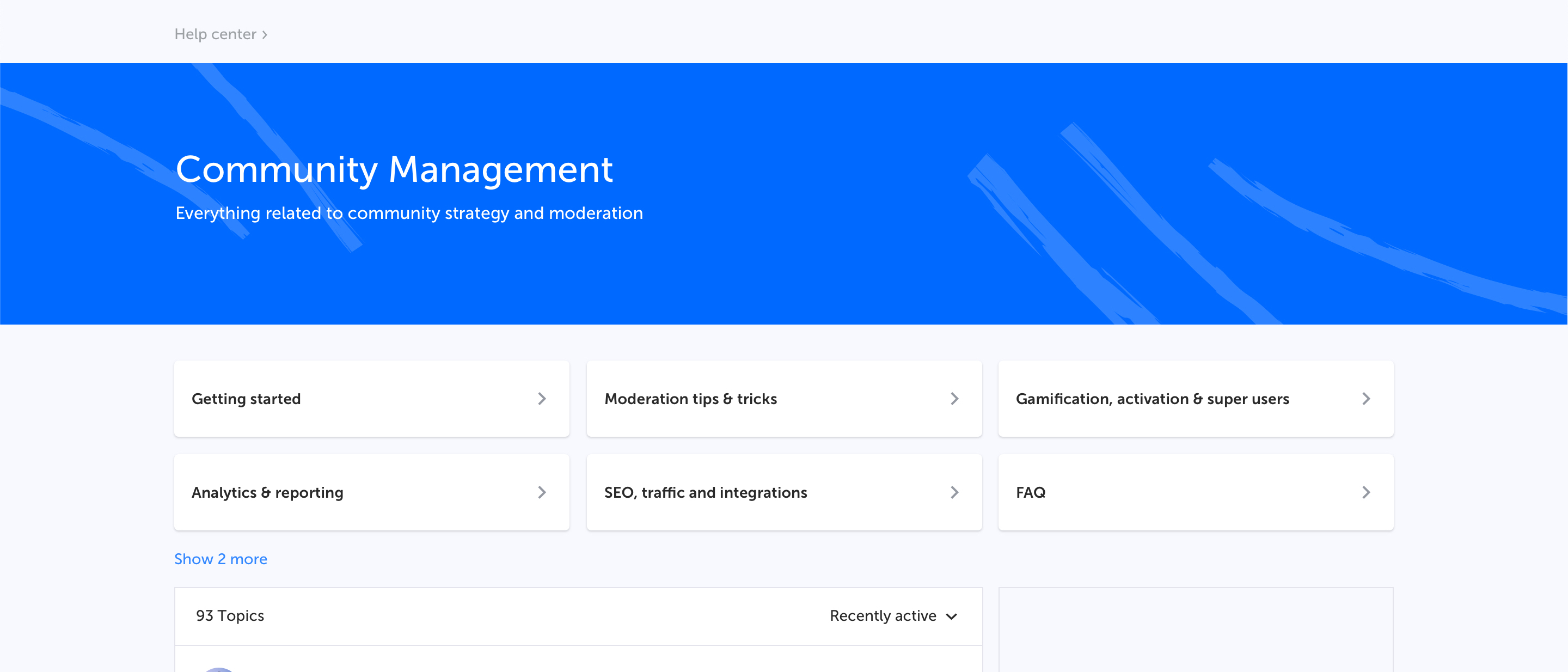
In the past months we have released a number of improvements which help you guide your users to the most relevant content. We believe that our next improvement will also be a major step forward in making access to the most relevant content much easier and more efficient. By introducing parent categories as a clickable page, you will soon be able to offer users a new area which includes all content from all categories in one overview. Difficult to explain, so maybe it’s better to define what we mean with (parent) categories and give some examples to avoid any confusion. Category, Forum, BoardWhen a user creates a topic he needs to select a place where it will be posted. You might have different names for this place (category, forum, subforum, board, section, etc), but for clarity we are calling it a category. To make sure we’re all speaking the same language we have created a visual that explains what we at inSided refer to as parent categories and normal categories. Various examples on where (parent) categories are displayed in the platform Why are we doing this?We see that specifically larger, mature communities with many categories would like to offer their (super)users a better experience while navigating the community. A parent category usually includes many related categories which all cover a product or a specific field of interest. Instead of having them change categories just to be up-to-date with the hottest discussions and latest questions, a separate parent category page with all content combined makes more sense. But this does not just provide value for large or established communities, it’s valuable for all shapes and sizes.. You as a community Manager are now able to structure content better, lowering the barrier between different categories in a knowledge base, improving the overall browsing experience. Last but not least: integrations. Why share a link to the entire community on a product page, when a link now can also present all FAQs, discussions and ideas in a single page? We would recommend you to start reviewing your integration plan to maximize the added value for your users. What will change?Throughout the platform changes will be made to facilitate and show this new parent category: Parent categories become a destination page that users can visit Parent categories will become clickable in the navigation (menu dropdown and homepage category stream) Parent categories will be listed in the topic streams Parent categories will be listed in the breadcrumbs Naming in Control FAQ Q: What will this new parent category page look like? A: Example of a parent category page "Community Management" with multiple categories “Getting started, Moderation tips & tricks etc.” Q: Which elements are shown? A: Hero banner with title and description Categories as navigation cards Topic list displaying topics from all categories sorted by recent activity General sidebar Q: Do I need to enable this new page for my users? A: No, the moment we enable this parent category page it’s always accessible for your users through the homepage, menu, breadcrumbs or direct URL. Q: Do I need to prepare anything? If you want to display a banner/image on top of the parent category page you have to provide one in the Control environment. Q: When will this be enabled on my production environment? April 2, 2019 Test on stagingAlthough we're still working on this functionality we enabled the parent category page on your staging environment already. There you can see and test all the changes mentioned above yourself, right now. We're looking forward to see the new categories in your platform. If you have any feedback or spot something unusual please let us know.

Now available: Homepage recommendations and configurable homepage streams
[Update] Enriching categories on homepage with category description
Upcoming changes to the inSpired Community

Upcoming changes to the inSpired Community

Hi all, as every year, we do a review of our inSpired Community to make sure it is the best place to talk about everything around inSided. Also this year we put our heads together to see what we want to change. In this article we want to share with you what we are up to: inSpired goes publicThe biggest change will be that, as of next week, our community will be publicly available for all to see & participate. We do that for various reasons, but one is to showcase our inSpired Community as a good example of a community-powered help center. Other vendors are already doing this, and we think that we have no good reason to keep inSpired closed any longer. Customer-only categories We do not want to lock people out just because they are not a customer (yet). Nevertheless, we also do not want non-customers to have access to potentially sensitive information, nor let them influence the way we work with your feedback in our ideation section. Therefore we have checked all content and decided to restrict some areas for customer-eyes-only. New featuresWe have some very cool improvements in the pipeline which have a great potential, and we will showcase them here on inSpired before we unleash them to your communities. But do not panic: every feature will be optional to use, even though we doubt that you would not like to activate them on your community. New categorizationWe are making some changes to our category structure. These changes will be made available in the upcoming weeks. Next to some general information around the platform, we will create a new space dedicated to our Community Managers, where we can discuss questions around KPIs and other items of relevance to the success of your community. New look and feelNew Banners, icons, etc. We will give our community a brand new look and feel, 100% aligned with our new company style. Very pleasing to the eye, and we hope you will like it as much as we do! "So when will this all happen?" you might ask... Monday the 4th of february will be the day where all this will come to life. Stay tuned and make sure to check out the new inSpired experience, and please share your thoughts about it with us!!!

Related products:CC Others

Moderator primary role permissions have been reduced

Update Thu 11 July: I've updated this article to reflect the fact that all moderator permissions we intended to remove have now been removed. Update Wed 24 April: we're going to start removing permissions from the moderator primary role this week (sorry for the delay - I think my advance notice was a bit too in advance). Read on for more details, and to see what actions you can take if you don't want this change to affect your moderation team! What has changed? We've removed the following permissions from the moderator primary role. Here's a visual showing how permissions have changed for moderators in Control - everything in green is still available for moderators; everything in red has been removed for moderators. Click each spoiler below to see the details of the permissions that moderators have lost access to: Analytics Content dashboard Members dashboard Success dashboard Post fields analysis Export Forum settings Homepage Forum structure Email alert Ideation Moderation Labels Content Helpfulness General settings User management User profile fields Custom User Roles Ranks Badges Phrases Platform visibility Post field overview File Uploads Spam prevention Integrations System configuration SSI configuration Third-party Scripts Appearance Basic Colors Buttons Fonts Header Navigation Widgets Embeddable widgets settings Installation Customization Setup Content configuration Read on to see how you can adapt to this change if you want your moderators to maintain their access to these permissions. Why did this change? The Moderator primary role was not clearly distinguishable from the Community Manager/Administrator role. By stripping away these default permissions from the Moderator primary role, the role has become much more flexible. It means you can choose to add moderators with access to the bare minimum features needed for moderation. However, if you want your moderators to have more access, you can simply grant them the extra permissions in a custom user role. I'd rather keep my moderator's permissions the way they are right now. How can I achieve this?This is really easy to do - just follow the steps below. Create a custom user role as follows Find the moderators you want to grant permissions to via Control > General Settings > User Overview and switch on the custom user role you created for them. Voila! Please note that the following options still won't be available, even with the custom user role described above. Let us know if you think this'll be a problem for you in the replies.Forum settings Content Helpfulness General settings File Uploads Spam prevention Integrations System configuration Third-party Scripts Embeddable widgets settings Installation Customization Content configuration Any other questions/feedback? Let us know in the replies! 😁

Related products:CC Users & Roles

Product improvements on quick links, content helpfulness, related topics and solved topics

We’ve made improvements to our platform functionality. We worked on quick links, content helpfulness, related topics and solved topics. If you’ve missed what’s new, here’s a roundup of everything we did: Quick links can now open in a new tabWe added a configuration option for quick links to open in a new tab based on your feedback in this topic. Now you can decide per quick link if it should open in the same tab or in a new tab, this may be especially useful if you are linking to destinations outside of your community. Content helpfulness visibility can be configured per topicWe deployed the ability to toggle on/off content helpfulness on individual topics. It is now possible to enable or disable content helpfulness on individual topics despite the generic setting. Use default (inherits default visibility setting for this topic type) Enable (will show content helpfulness regardless the default setting) Disable (will hide content helpfulness regardless the default setting) Related topics are more relevantWe connected the Related topics widget to the same datapoint as we use for our live-search engine as we announced in this topic. Both live-search and the related topics now provide the same relevancy and results when searching for or reading information. Solved topics will appear as a “Rich result” in GoogleWe enriched topics that have a marked best answer with Q&A structured data. Google search results for eligible Q&A pages display a preview of the top answer when users search on a mobile device. This new presentation helps site owners reach the right users for their content and helps users get the relevant information about their questions faster. More info on Google rich results can be found here: Rich Results expands for Question & Answer pages Curious how your solved topics appear in Google? Use Google test engine for rich data to analyze your topics and see a preview That’s everything for this update, we hope you like the new improvements we made. Be sure to get in touch if you have any questions.

WYSIWYG Editor For 'Edit' mode in Control now available 🎁

We've made the WYSIWYG editor available for editing all posts in Control; now you don't need to go to the frontend to edit and see a preview of the content that you're editing! Read on for more details. What's included in this release? We have made the WYSIWYG editor the default editor for editing in Control. We have added an option to 'Edit with BBcode' (this button is right next to the standard 'Edit post' button). Clicking this button loads the old BBcode editor, allowing you to correct any BBcode formatting issues that may occur and that can't be fixed using the WYSIWYG editor. Hopefully you don't have to use it too often! With this release, it's now possible to carry out your content creation/editing workflow entirely from Control. This means, for example, that there's no need to switch to the frontend to edit your articles that you're still preparing. What else is coming up (related to the editor & articles)? Coming up this quarter we're going to continue delivering updates related to the articles creation workflow. Specifically, we aim to make it easier for you to create and manage articles. In the pipeline, we have ideas ranging from a dedicated drafts feature, to showing the 'last updated' date on articles, all the way to upgraded formatting capabilities. We hope to share more information with you soon! Please let us know your opinion/feedback on this release in the replies below 😊. Note: we’re also tackling some bugs related to the editor, including: Replying in Internet Explorer 11 appears to be broken - we're investigating this right now. BBcode is shown after saving an edit in Control (refresh the page to see the proper formatting again).

Related products:
Create your own sidebar widget from scratch

Create your own sidebar widget from scratch

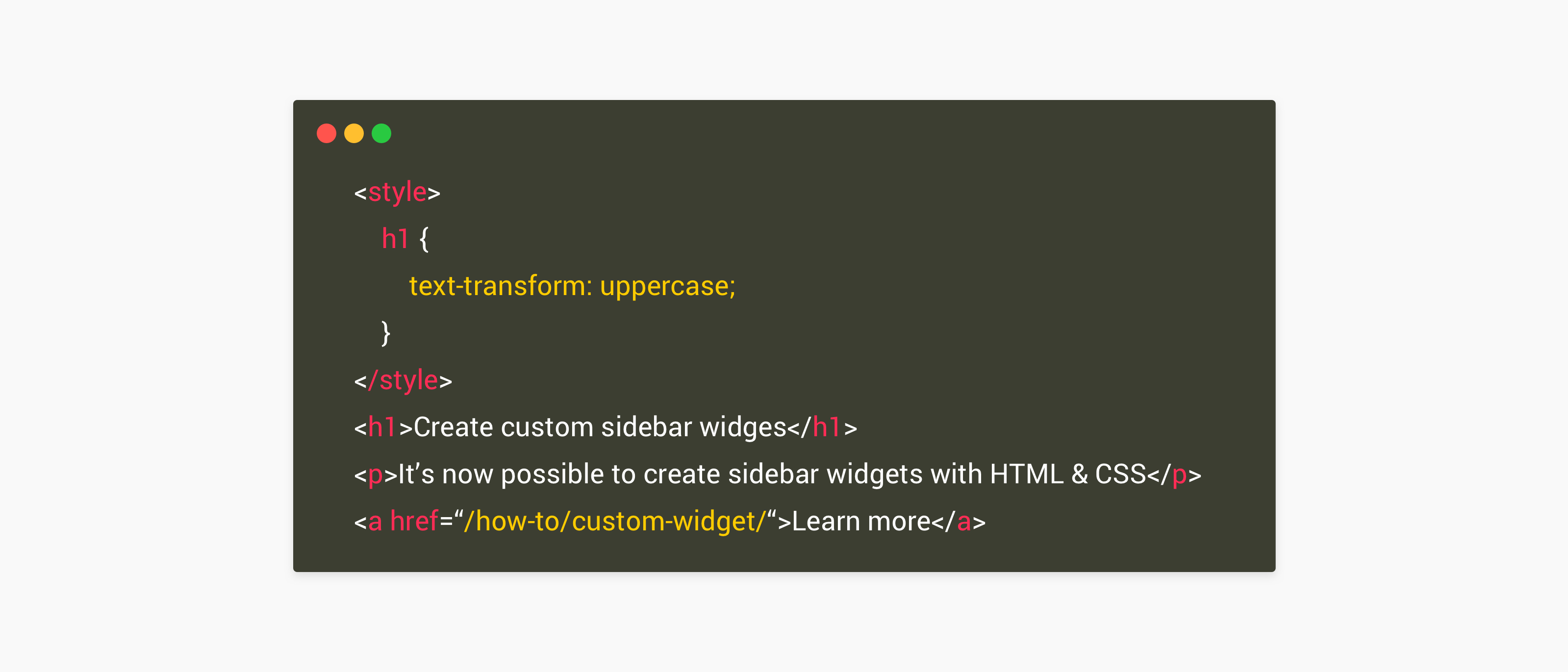
Ever since we released the widget management module in Control we received feedback and requests for a so called 'Open text widget'. This widget would allow you to create anything you like from scratch with code support. We're super happy to announce that as of today this widget is available for you.   What is available? We added two new widget types to our widget library (Control > Appearance > Widgets).HTML Block: Allows you to create/code your own widget from scratch. Code support is available so you can insert HTML/CSS, Javascript, Embed codes, iFrames and more.Text Block: Allows you to put plain text in a sidebar widget   What can I do with this? The possibilities are endless, if you have some coding knowledge you can basically create whatever you want, here are some possibilities: Create an image banner to your webshop / promotion Create a call to action to your latest ebook Display a list of your community moderators Insert a poll from a Third Party Embed a twitter timeline Display a promotion video Display a list of other contacts options such as email, phone and twitter You can add widgets to your sidebars and determine the position where it should show.   How do I get started? You can start right away by navigating to your Widget Library in Control (Control > Configuration > Sidebar). We created a small 'how to' to help you get started:How To Create a Custom Sidebar Widget (with HTML/CSS)Beware: a little bit of coding knowledge is required to get the most out of this feature. We highly recommend you to invite a web developer who can help you out on writing valid code and to test on your staging environment first.   Feedback, ideas, suggestions? We hope you enjoy this new feature and we're happy to hear your thoughts. If you have any feedback, ideas or suggestions leave them in the comments below

Updates to the Moderator primary role - removed ability for moderators to grant/revoke roles

We've released a small update to the Moderator primary role. Read on for more details! What's changed? Moderators can no longer (by default) grant/revoke roles for any users. This includes both primary and custom roles. Moderators no longer have access to the 'Custom User Roles' section in Control. Why has this changed? Moderators were able to escalate their own role to Administrator. We believe moderators should not be able to autonomously gain access to Administrator privileges 🙂. I don't like this change. How can I make things go back to the way they were for my moderators? We understand not everyone is keen on this change, and that's fine; our challenge is to provide a system that's flexible enough for everyone's needs. If you want to give your moderators the ability to grant/revoke primary/custom roles again, all you have to do is set up a custom user role with the 'Users' permission enabled. Apply this custom user role to your moderators and you're good to go. What other changes are in the pipeline? We're also looking into removing further permissions from the moderator role. Just like this change, you'll be able to reenable the vast majority of them through custom user roles. Here's the draft list of permissions that we plan to remove from the moderator role by default (all of these can be reenabled through custom user roles, should you want your moderators to keep on having access to them): Analytics General settings Forum settings System configuration Appearance Embeddable widgets settings Let us know your feedback in the comments below!

Related products:CC Users & Roles
Content Helpfulness is now available!

Content Helpfulness is now available!

As of today Content Helpfulness* is available for your communities. This allows your visitors to vote on the helpfulness of topics in your community, you can decide on which topics they should vote. Read on to learn more. What is Content helpfulness?A feature added to topic pages where users can indicate if they found the topic helpful or not. Users can reply by picking an Emoji to indicate whether or not it has helped them. After they voted for a topic they will see a thank you message and will no longer be asked to vote. You have the possibility to show the helpfulness score (= helpful votes/all votes*100) to your users, this will only show the score after at least 5 votes have been submitted. Where is it shown?By default it will be shown below the opening post on all articles and topics that have a marked best answer. When the users starts scrolling to read the comments a small bottom bar will appear allowing the user to vote at any given moment. Where can I see the results?Votes are directly sent to the topic moderation page in the Control Environment. Topic that have topic helpfulness enabled will have an additional 'Content Helpfulness Performance' panel showing the distribution of votes and the helpfulness score Next to that Data will be logged to your Google Analytics under Behavior > Events > Top Events. If you click on the event action 'Topic Helpfulness' it will show an overall distribution on the positive, neutral and negative votes. To see which topics are voted for you can set the Primary Dimension to 'Event Action' and the Secondary Dimension to 'Page title' this will show a list of topics and their votes. Which configuration options are available?In the Control environment you'll be able to view and change the following options: Change the messaging Toggle on/off to display the Helpfulness Score to your users Change on which content types this feature should appear Read the How To guid to learn more: How To Configure Content Helpfulness What's nextWe have more improvements planned: Add data to Content Dashboard Ability to toggle on/off this feature on individual topics Improve our search algorithm with the helpfulness score, helpful content will rank better in the search engine We'll keep you posted on updates here on inSpired Thank youA shout out to all pilot customers who helped us shape this feature from the start by giving feedback & spotting bugs @Stéphan Lam@Kat@ErikT@Florian@Hiewwaiy *We renamed this feature from topic helpfulness to content helpfulness since this functionality may cover all the content types in your platform. Update I January 16thWe deployed the ability to toggle on/off content helpfulness on individual topics. In the topic moderation page we added a configuration setting where you can determine the visibility: Use default (inherits default setting for this topic type) Enable (will show content helpfulness regardless the default setting) Disable (will hide content helpfulness regardless the default setting) Update II January 30We shipped an improvement on the usability of the content helpfulness panel: The panel will no longer appear when the user is scrolling down (and reading). The panel will only appear when the users stops scrolling down and starts scrolling back to the top.

Retiring the survey module - Announcing integration with Typeform

Retiring the survey module - Announcing integration with Typeform

Say hello to Typeform! Last week Daniel mentioned the retirement of the survey module, which is now in effect. Today we're happy to announce that you now have the ability to embed Typeform surveys in your post. Here's an example of a Typeform survey. FAQ How to add a Typeform survey to your topic? Press the 'Embed media' icon, paste your Typeform URL and press 'Insert'. Your Typeform survey will now be embedded in your post. Can I still use the inSided Survey functionality? No, this feature has reached the end of life status, and has been disabled. Can I still use the inSided Poll functionality? Yes, the poll feature is still available for customers. Do I have to pay to be able to use TypeForm? inSided treats TypeForm just like any other 3rd party content you can embed in our WYSIWYG editor (Youtube, Vimeo, ….) We are not responsible for the management of the content, but just allow you to visualise it in your community. This means that you will need to have a subscription with TypeForm that will allow you to create and manage surveys. Typeform has both free and paying subscriptions, you can find more info here. How does TypeForm handle data security and privacy? You can find all the necessary information in the links below. What happens to my data? What is GDPR? Data portability GDPR rights for respondents What other companies do we share data with? Security at Typeform If you don't want to store the data on TypeForm servers, you can use the Responses API to send the data somewhere else AND delete the data from their platform (and servers). The data will be erased immediately from their main servers and will be deleted from their backup servers after 30 days. Please let us know if you have any questions!

Quick links are here!
Roadmap Update December 2018

Roadmap Update December 2018

This roadmap update highlights the features & improvements planned for the inSided platform. Priorities can change as we face new challenges. At inSided we are committed to executing iterative and rapid improvements based on our vision and feedback from our users and customers. Got an idea on how we can improve our platform? Don't hesitate to post your idea on our Ideation board. Product updates coming soon: Improvements to the core of our platform We've begun the process of rolling out core platform improvements across all communities, which we aim to keep as quiet/unnoticeable as possible (please read the announcement article to learn the details changes to functionality for moderators that you need to be aware of). API 2.0 Beta - Conversations and Questions (including Webhooks) Once the core improvements to our platform are rolled out, we'll be able to launch the beta for API 2.0, which will provide a more consistent REST experience for developers. The first release of the new API will provide you with all key functionality for Conversations and Questions, including moderator actions. Apologies for the delay on this release. WYSIWYG editor in Control We're integrating the WYSIWYG editor used on the frontend into the Control environment. Our first focus is on integrating the editor into the create topic workflow in Control, making it easier to create articles. At last, you'll be able to to see directly how your article will look before publishing it. We're also working on integrating the WYSIWYG editor for replying to topics in Control, helping you moderate and respond faster. This will include support for @mentions in Control, as well as a couple of extra keyboard shortcuts e.g. for adding links and strikethrough text). Thanks to our beta testers for their helpful feedback so far! Quick links Quick links guide your users to virtually wherever you want them to be. Everything that has an URL can be linked to: categories, articles, documentation etc. You can preview this feature on the inSpired community. Topic Helpfulness Allow visitors to indicate whether a topic was helpful or not. After a successful beta release, we're working on making this feature publicly available. Some nifty improvements are included such as a new design, emoji voting system, configuration options in Control. We'll also make sure that data and insights are sent to your Control environment. More information can be found in this topic. Want early access? Leave a comment below. Open text widget Create your own sidebar widget from scratch with the use of HTML/CSS. We'll enrich the widget library with an 'open text' widget that allows you to create your own widgets from scratch. Typeform support We will retire the survey feature. From Friday 14 December onwards it's no longer possible to create surveys in Control. As soon as we retire the ability to create a survey, we will simultaneously release the option to embed a Typeform survey in posts. Typeform allows you to create versatile rich surveys with numerous different question types. GIFs We're in progress with re-enabling support for GIFs right now. We appreciate your patience here! Notification when a user's reply is marked as the best answer We plan to work on this idea from @Arakou - which aims to give your superusers a motivation boost by alerting them every time one of their replies is marked as the best answer. Community members will be able to disable these email notifications from their profile. We'll provide ample warning before enabling the notifications for this new email notification, to give you the chance to customize the notification to fit your brand. Add close topic to bulk operations This idea from @Ditte was on the last roadmap update, but unfortunately is currently impeded by our core platform improvements. We’ve left it here just so you’re aware we still plan to pick this up! Completed product improvements: November 2018 Assign to me functionality for moderators (Idea) Configure fonts Topic Helpfulness Emoji rate system and Content Performance panel in Control Exclude non-verified accounts from the members dashboard October 2018 Read all button on the homepage (Idea) Live Search September 2018 Enable only the in-page widget & add embeddable widgets to more than one domain View topics in the embeddable widgets, without leaving the page Gather topic helpfulness feedback in the embeddable widgets Remove the option to do an empty search (Idea) Make timestamp stand out more on a profile’s activity feed (Idea) August 2018 Upload & Attach Files to posts Allowing super-users to mark answers Embeddable Widgets - Configure The Content Shown On Specific Pages Of Your Site July 2018 Community Success Dashboard Spam Prevention - Self Service Configure header colors and settings Configure community- and category title colors June 2018 Configure navigation bar colours Spam self-service May 2018 GDPR - User Erasure 3rd party scripts Self-Service for Branded Templates Community statistics widget April 2018 Community Widget Management Improved Member Dashboard Unanswered Topics tab March 2018 Improved Content Dashboard Embeddable Widgets Members Dashboard (First version) Configure introduction widget colors Read/unread topics indicator Super User as a primary role February 2018 Breadcrumbs for Branded Templates Improved Phrases tool Self-Service moderation labels for Branded Templates Default avatars Self-Service styling for Branded Templates January 2018 Pending-post approval for Spam prevention Self-Service category permissions Self-Service badges

Related products:CC Others

Now available: WYSIWYG Editor In Control (Create Topic Only)

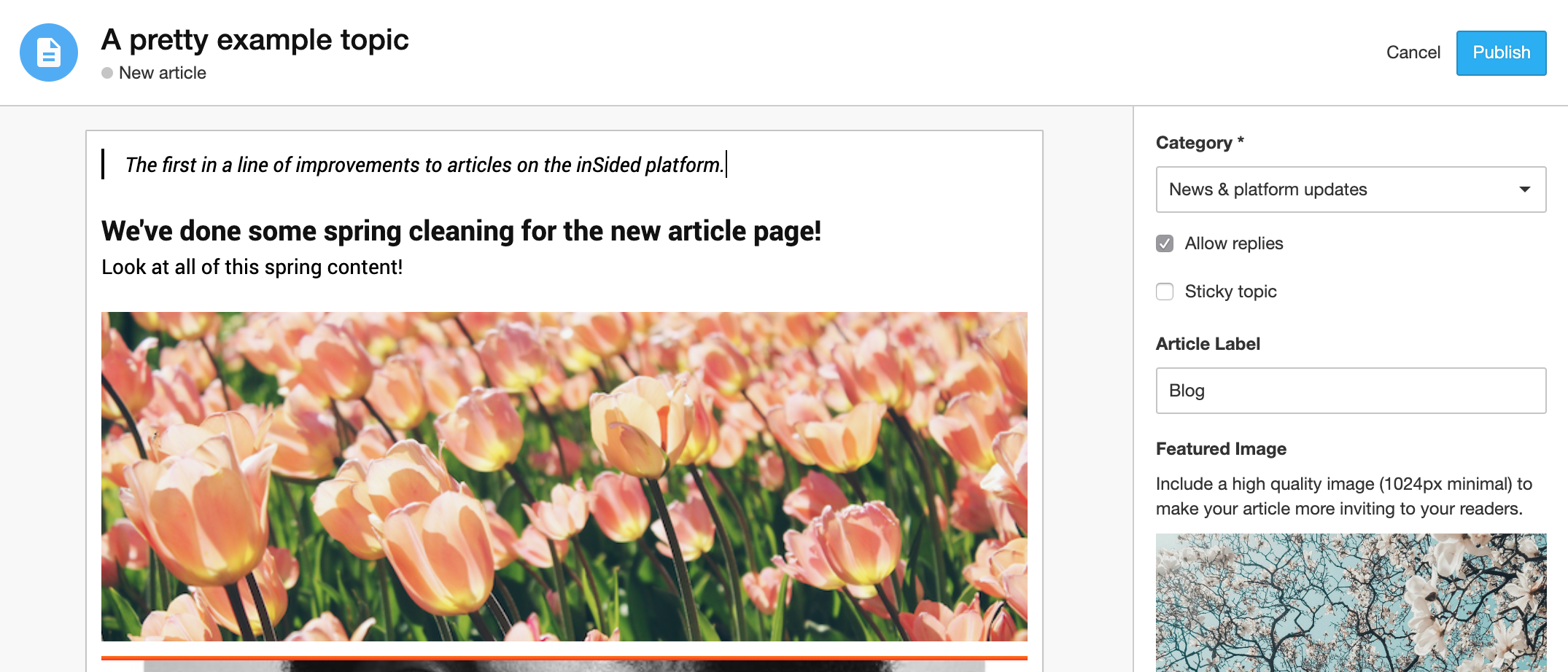
Updated Thu 13 Dec 2018 @ 16:25 Just a heads up for you and your moderation team: we plan to release an update to the editor for the create topic page in Control this week. Read on for more details! We have released an update to the editor on the create topic page in Control for all (branded) customers. Read on for more details! What has changed? We have replaced the old BBcode editor in Control for creating a topic with a WYSIWYG editor (the same component your community members use on the frontend). What exactly is included in the release of the WYSIWYG editor for creating topics in Control? All the same formatting options currently available in the WYSIWYG editor on the frontend. A bigger post editing area, which matches the width of the desktop view in the frontend, and which scales as you type, so you can easily see/preview your whole article before publishing. Copy/pasting text with formatting from another editor will also become easier. New shortcut: Add hyperlinks using CTRL/CMD-K New shortcut: Add strikethrough formatting using CTRL/CMD-SHIFT-X. @mentions (for create topic only right now...although we're working on this for replies...read below for more info!) We hope this will make the creation of Articles a little bit easier for you! What is not included in this release? No new capabilities have been added to the editor in general (e.g. still no tables). This falls under our longer-term vision to provide all the rich formatting capabilities you need to best serve your community. You won't be able to preview the exact font you use on the frontend (although we have made at least a few cosmetic improvements so it's easier to see line breaks/space under headings etc). What are the next steps for the editor in Control? Replying in Control using the WYSIWYG editor. We're in beta with this and expect to release this as a next step (we'll give fair warning about this since it'll have a more significant impact on your moderation team). This will include @mentions for replies in Control. Editing in Control using the WYSIWYG editor. We're investigating this, and keeping in mind that posts can often 'break' and can only be resolved by viewing/editing the BBcode itself. Additional info 'Unofficially supported' BBcode options like 'color' will continue to work if you manually add in the BBcode (just like they currently do in the WYSIWYG editor on the frontend). Hope you like this update! Please let us know if you have any questions/feedback 🙂

Related products:
Topic helpfulness v2.0

Topic helpfulness v2.0

Some time ago we announced Topic Helpfulness here on inSpired. After this beta release we've been looking into ways how to improve this functionality. Thanks to you and our pilot customers (who tested this feature, shared data and gave their feedback on improvements) we were able to deploy some nice improvements; A fresh new look & feel Replaced the binary vote system (yes/no) by a universally known emoji vote system Fixed vote bar that appears when the user starts scrolling in a topic Make topic helpfulness available on all Answers and Articles What is Topic helpfulness?A little area below the opening post where users can indicate if they found the topic helpful or not. Users can reply by picking an Emoji to indicate whether or not it has helped them. This data/event will then be directly logged into your Google analytics, giving you clear view on which topics/content are helping people the most. For the moment data is not visible in the Control Environment yet. What's nextWe're working on configuration options in the Control environment, this allows you to determine the phrases of the topic helpfulness and where it should appear. Next to that we're making data on the votes available in Control: topic moderation pages will be enriched with a 'Content performance panel' and the data will be sent to the Content dashboard. When will this feature be available on my Community?When configuration options, data and insights for this functionality are available in the Control Environment. We want to ensure you have complete freedom over the visibility and have access to the data from day 1. Pilot customers already have the latest improvements mentioned above. Early accessCan't wait until the public release and want to have it now? We can enable the latest version of topic helpfulness on your community. This means visitors can already vote on the helpfulness of Answers and Articles, data will be sent to your Google Analytics account where you can analyse results yourself. Sent me a private message if you want early access. We will keep you posted here on inSpired on improvements and new milestones, if you have any questions or feedback let us know.

Quicklinks are now previewing on inSpired!

Quicklinks are now previewing on inSpired!

Surprise! 🎉 Our new favorite feature, Quicklinks, is now previewing on the inSpired community! This feature is our first, bigger step towards our vision of a true self-service platform which will enable you to give your customers an experience that reaches beyond your community. What are Quicklinks? Quicklinks are there to guide your users to... virtually wherever you want them to be! Just a few examples: That one article that you want everybody to see when they visit A category which you want to highlight to everyone Most viewed / searched topics, articles, FAQs A PDF file (e.g. a manual) Any website / url outside of the community Basically everything that has an url! You can decide yourself how many of these links should be presented and how they are being presented. Fully self-service. A quicklink is set up in three steps: Add your own title & description Add your url choose between image/icon/nothing to be displayed at the top Unhappy with the order? Simply drag & drop the tiles to give it a new twist, it's that simple. Quicklinks on the Homepage In this example you can see a mix of different use cases for quicklinks (all are using icons btw). Two more tiles can be expanded here, should the user wish to: If you should choose 4 quicklinks instead of six, the layout changes accordingly. Setup in Control Below a sneak-peak at the settings in your Control environment (final experience may vary). Next to the order of tiles, you can enable/disable the general visibility and the border options. They will be located in the new "Homepage"-settings page in your Control environment. From here you will also select and edit individual quicklinks: FAQs Do we have to pay to turn this feature on? Of course not! It is standard for all branded template communities. What happens to featured topics? They will stay as it is. Not exactly however, we want to improve the way you use them. Stay tuned for updates on that. When will it be released / available? We are still brushing it off to give you the best experience. We don't want to put a deadline on this, as we want to ensure quality. But expect it very soon! Will it be turned on automatically once you release it? No. You have all the time you need to set it up in your Control environment, you can activate it whenever you feel ready. Feedback We are not just testing here, we also need your feedback. :) What do you like? What would you like to see different? What are you missing? We are very curious how you experience this feature. So take your chance and help shaping it!

Upcoming changes to topic moderation due to core platform improvements

Over the next couple of weeks we’ll be rolling out an update with some core improvements to our platform. Since we’re migrating one-by-one to ensure a smooth transition, your community might receive this update earlier or later than other communities, sometime in the next few weeks. Most of the changes will be silent/unnoticeable and mainly concern improving the stability, consistency, and quality of the inSided platform. However, there are a few changes to topic moderation which will take effect once your community has been updated: Converting the topic type of questions/conversations To convert a question to a conversation (and vice versa), we will no longer show the 'contains question' switch. Instead, to convert between these content types on the topic moderation page, you'll need to go to More options > Convert to conversation (or Convert to question). Moving multiple replies to a brand-new topic It will no longer be possible to move multiple replies in one go to a brand-new topic. To achieve this, you first need to ‘promote’ a reply to a new topic, and then move the replies in a second transaction. We’d like to improve the user experience of this part of the moderation workflow (related ideas like this are on our radar). This didn’t fall under the scope of our core improvements, which are more focused on platform stability/consistency/quality. To help us assess the priority of improving this, it would be great to hear real-world examples of how you use this feature and how often. Moving the opening post of a question/conversation/article It is no longer possible to create a brand-new topic from the opening post of an existing topic (we hope you’ll agree with us that this makes very little sense) 🦆. You’ll only be able to move the opening post of a topic to another topic if the topic has no visible replies. Moving replies to an existing question/conversation It’s now possible to move opening posts/replies from one topic to another topic without replacing the opening post of the topic you’re moving to, even if the opening post/reply that you're moving is older than the opening post. This change was based on the feedback in this idea and based on the fact that moving an opening post to a topic is essentially ‘convert to reply’. At first, this will only be possible for conversations/questions (not articles). We have the same behaviour changes planned for articles, which will be available at the same time moving replies to/from articles becomes available again. We'll update the idea that inspired this change once it's available for all content types. Changes to moderator approval of posts by new users (aka ‘Pending Posts’) If you enable the pending posts feature, then until you turn it off all posts submitted to the community will become ‘pending’ (not visible, awaiting explicit approval by a moderator). Beforehand, if a user had been active on the community (created a new topic or replied to an existing topic), they were exempt from the pending posts system. Now, it affects posts by everyone except moderators, community managers, and administrators. Since launching Akismet, we haven’t seen any demand for this feature due to the lowered incidence of spam on our platform. If you foresee these changes to pending posts as a problem, please give your opinion below. Character limit per post - enforcing a 30k limit This will become standardised at 30k characters. This limit is liable to change (increase) in the future - it is currently limited to 30k due to a need on our side to optimise performance. We’d love to hear from you below if you find 30k characters too limiting! We’ve heard specific feedback about the need to increase the length due to the need to include code samples/logs in posts. ⚠ Just to be clear: this update is not live on any of your Control environments yet. We expect this update (and the changes detailed above) to be rolled out on your community anytime from the beginning from the middle of this week until towards the middle of December. Please share your opinions on these changes. If there’s any change here that will negatively impact your experience as a daily or weekly Control moderator then we want to hear from you, so that we can improve it in the future.

Related products:CC Moderation

🛠Moving replies to/from articles will be unavailable for a couple of weeks

Update #4 (Mar 2019): it's now possible to move replies to/from articles again - thanks for your patience! Update #3 (Feb 2019): rolling out the core improvements to our platform is taking longer than expected - apologies for the delay. It's our top priority to finalise rolling out these improvements, which will restore this functionality to your Control environment. Update #2: this will only affected branded customers. Update #1: moving replies both from and to articles will be unavailable. What exactly will be unavailable? For all customers running on branded: Moderators won’t be able to move a reply/replies from an article to existing conversations/questions/articles and vice versa. Moderators won’t be able to move a reply/replies from an article to a new topic. Why will moving replies from articles be unavailable? We're making some big core improvements to our platform - these big improvements are being rolled out in smaller batches to ensure a smooth transition and maintain the quality of your communities. As a result, moving replies from articles to a new topic & existing questions/conversations will be unavailable whilst we roll out the first batch of improvements. From when will moving replies to/from articles be unavailable? We expect to make the feature unavailable across all communities from this week forwards (it will not happen simultaneously for all communities, so we can't provide a specific date/time). When will moving replies to/from articles be available again? We aim to make the feature available again within the next 2-4 weeks. As of February 2019, we expect this feature to become available again by no later than the end of March. We're really sorry for any inconvenience to your moderation workflow! We're working to make this feature available to you again as soon as possible.

Related products:CC Moderation
Roadmap update October-November 2018

Roadmap update October-November 2018

This roadmap update highlights the features & improvements planned for the inSided platform. Priorities can change as we face new challenges. At inSided we are committed to executing iterative and rapid improvements based on our vision and feedback from our users and customers. Got an idea on how we can improve our platform? Don't hesitate to post your idea on our Ideation board. We are very excited that Live Search is now available for all branded communities, yey! Topic helpfulness is still under construction, after deploying it for a number of pilot customers we are now working on some smaller improvements to turn this into a killer feature. We are sorry to announce that we have to push the release of the new API once again forward. With the new API, we also needed to rebuild a few core components of our platform. Since this is a quite big release, we need to make sure we fix all the bugs and can guarantee a stable and performant platform. With half of our development team now focussing on this, we should see it coming available soon. Product updates coming soon: First beta for API 2.0 - Conversations and Questions (including Webhooks) We have been working on a new API which will provide a more consistent REST experience. We are expecting to start a beta for all of our Branded Templates customers soon. The first release of the new API is providing you with all the functionality for the conversations and questions domains, also including moderator actions. Topic Helpfulness This element will be added to Q&A topics and allows user to indicate if they found a topic helpful or not. This data will be directly logged into your Google analytics, giving you a clear view on which topics/content are helping people the most. You can preview this feature on the inSpired community. A new and better way of asking a question Asking questions should be easy and fun. Adding more information to your question such as descriptions, images, videos and tags should be optional, not required. We're working on a simpler way to ask questions in order to generate high-quality Q&A's Read all button on homepage This idea added by Lorna, will allow users to mark all the new posts as read. Add close topic to bulk operations This idea added by Ditte, will allow moderators to close a number of topics in one bulk operation. This should be a time-saver for moderators. Completed Projects & ImprovementsSeptember 2018 Enable only the in-page widget & add embeddable widgets to more than one domain View topics in the embeddable widgets, without leaving the page Gather topic helpfulness feedback in the embeddable widgets Remove the option to do an empty search (Idea) Make timestamp stand out more on a profile’s activity feed (Idea) August 2018 Upload & Attach Files to posts Allowing super-users to mark answers Embeddable Widgets - Configure The Content Shown On Specific Pages Of Your Site July 2018 Community Success Dashboard Spam Prevention - Self Service Configure header colors and settings Configure community- and category title colors June 2018 Configure navigation bar colours Spam self-service May 2018 GDPR - User Erasure 3rd party scripts Self-Service for Branded Templates Community statistics widget April 2018 Community Widget Management Improved Member Dashboard Unanswered Topics tab March 2018 Improved Content Dashboard Embeddable Widgets Members Dashboard (First version) Configure introduction widget colors Read/unread topics indicator Super User as a primary role February 2018 Breadcrumbs for Branded Templates Improved Phrases tool Self-Service moderation labels for Branded Templates Default avatars Self-Service styling for Branded Templates January 2018 Pending-post approval for Spam prevention Self-Service category permissions Self-Service badges December 2017 Status-Page WYSIWYG editor for Branded Templates

Related products:CC Others
Live-search = Live!

Live-search = Live!

Goodmorning! We're extremely excited to announce that live-search has been enabled for your communities as of today. From now on when your users start searching they will get a list of relevant results directly below their search query. Live-search comes with an improved algorithm on the relevancy of search results. We enabled this new algorithm last week already to monitor the performance. (we want to make sure live-search brings the best results to your users). We see a slight increase of +/- 4% of users who click on a search results after they performed a search. We believe that adding live-search will increase the click rate on search results even more. By clicking the 'Search' the user will directly go to the search results page showing the most relevant results. Clicking on a topic in the dropdown will bring the user to the topic (pretty obvious ;)) If a user can't find the information he's looking for he can ask a question to the community, this will bring him to the create new topic page 🙂 For this interaction we made some small tweaks as well. If a user is not logged in and wants to ask a question we will still bring him to the create topic page and then show the login/registration modal. This way the user know what he can expect the moment he has an account. We hope you're as excited as we are on this new feature. Let us know what you think, or if you have any feedback, in the comments below.