  • 475 Product updates

The New 'Report Content' Feature

The New 'Report Content' Feature

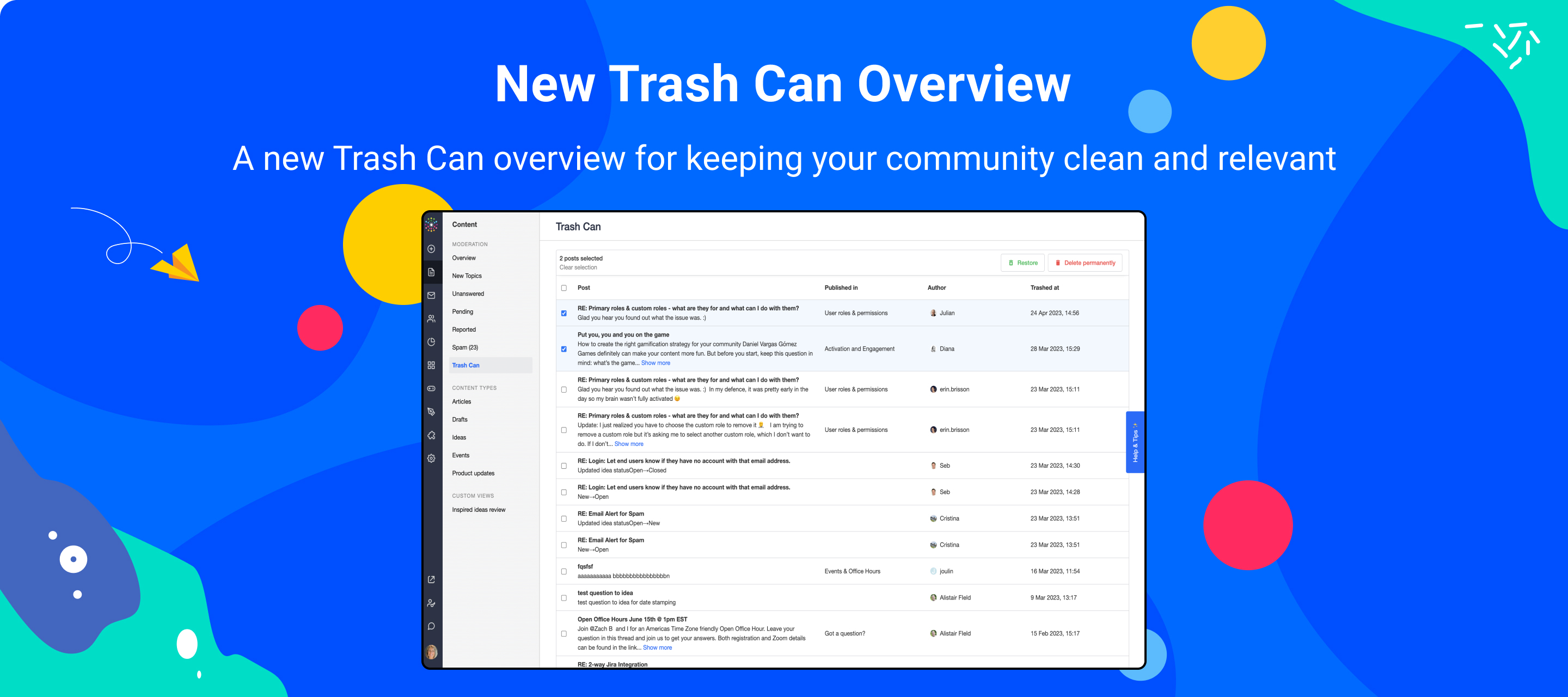
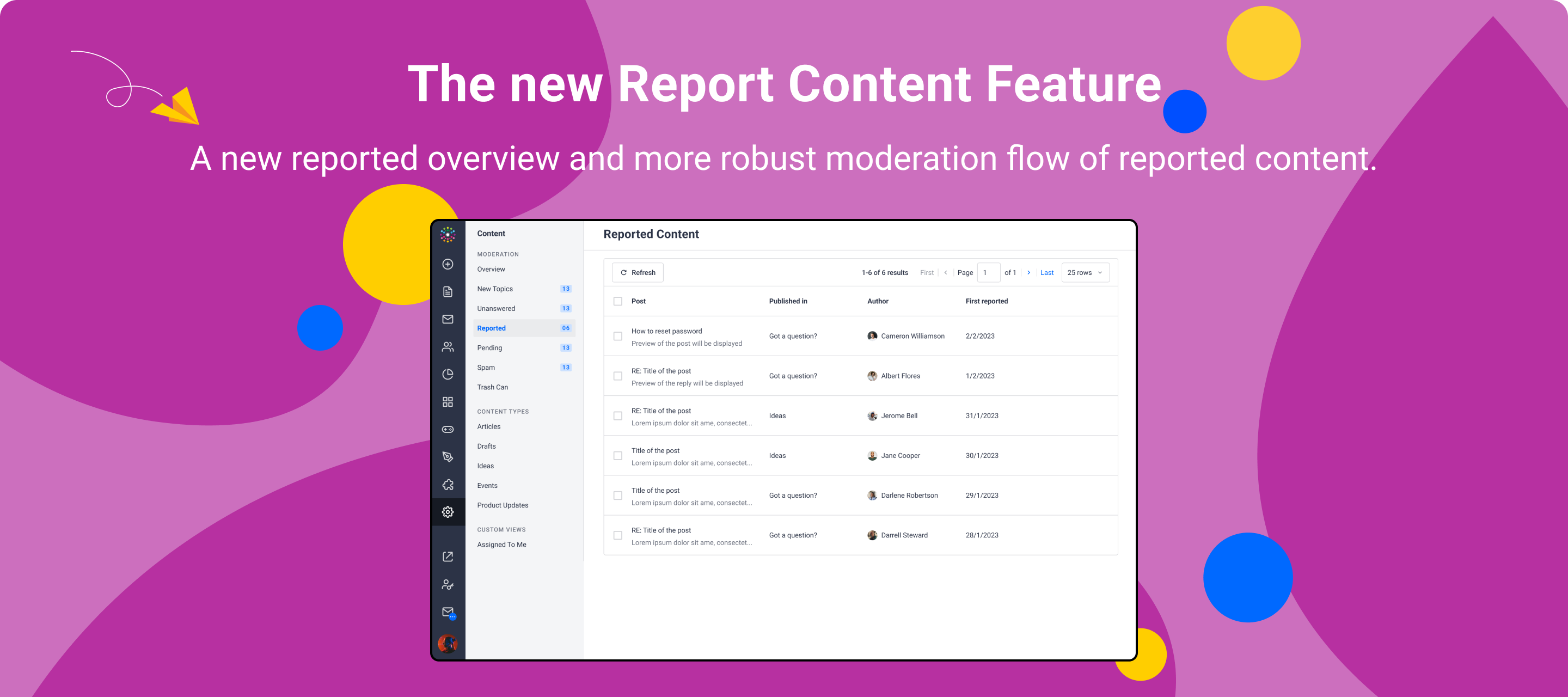
We are happy to bring you a new feature that allows end-users to report content and includes a new moderation overview in Control with a more robust moderation flow of the reported content submitted by community users.  One of the main focus points for a community team is to ensure that the information shared on the Customer Hub is relevant and accurate and that all user interactions are appropriate. In that context, we want to empower community members to help as an extra pair of eyes and make significant improvements to the community content.The Reported Content Feature allows community members to notify and escalate content to moderators for review. This content could include posts that were not caught by the spam checker or are considered an inappropriate or unprofessional interaction, or the content needs updating or is inaccurate.  The New Reported Content Feature - Key HighlightsIn comparison to the old “flagging feature” you might be familiar with, the new Report Content Feature allows users to report Ideas, replies on Ideas, and Product Updates to moderators.  Furthermore, moderators can see the report reasons submitted by community users when viewing the topic moderation page in Control.  Reported Content Overview Page Another great improvement for moderators is the ability to send a private message to the user(s) who reported a post when they resolve the report directly from the topic page. The message is pre-filled and can be edited by the moderator as they see fit or sent as is.  Resolving content from the topic moderation page Lastly, moderators can now bulk-resolve reported content from the overview when they assess multiple topics that do not need individual moderation. There is also a corresponding public API endpoint to enable additional workflows, but please note that the API call does not send out private messages to reporters.  Bulk- resolve reported content We hope this new version of the flagging feature empowers community members to more easily escalate content for moderators to review and simplifies the moderators’ workflow of handling reported content, as well as streamlines the communication between the two, making your communities a safe and professional space for everyone to enjoy, share and consume information from! Good to know:A private message is automatically sent to the reporter when the moderator ‘resolves’ the reported content. This private message cannot be skipped but can be edited.  For questions, conversations, and articles, the topic moderation page needs to be manually refreshed to not show ‘Reported’ anymore once moderators have resolved content - we’re working on a new page that will not have his issue 💪 If a moderator trashes reported content without resolving it first, the content will still appear in the Reported Content Overview Page. Moderators should resolve the content first and then trash it.  Please note that the Reported Content Overview Page is replacing the deprecated Flagged Overview Page. All reports made by end-users will thus go to the Reported Content Overview Page, and will no longer appear on the Flagged Overview Page.  For more details on how this new feature works, please read our short guide in this article. ⭐️ As always, we would love to hear your thoughts and feedback in the comments! ⭐️

Related products:CC Moderation
Introducing Custom Pages: Add unique, customizable pages to the customer hub

Introducing Custom Pages: Add unique, customizable pages to the customer hub

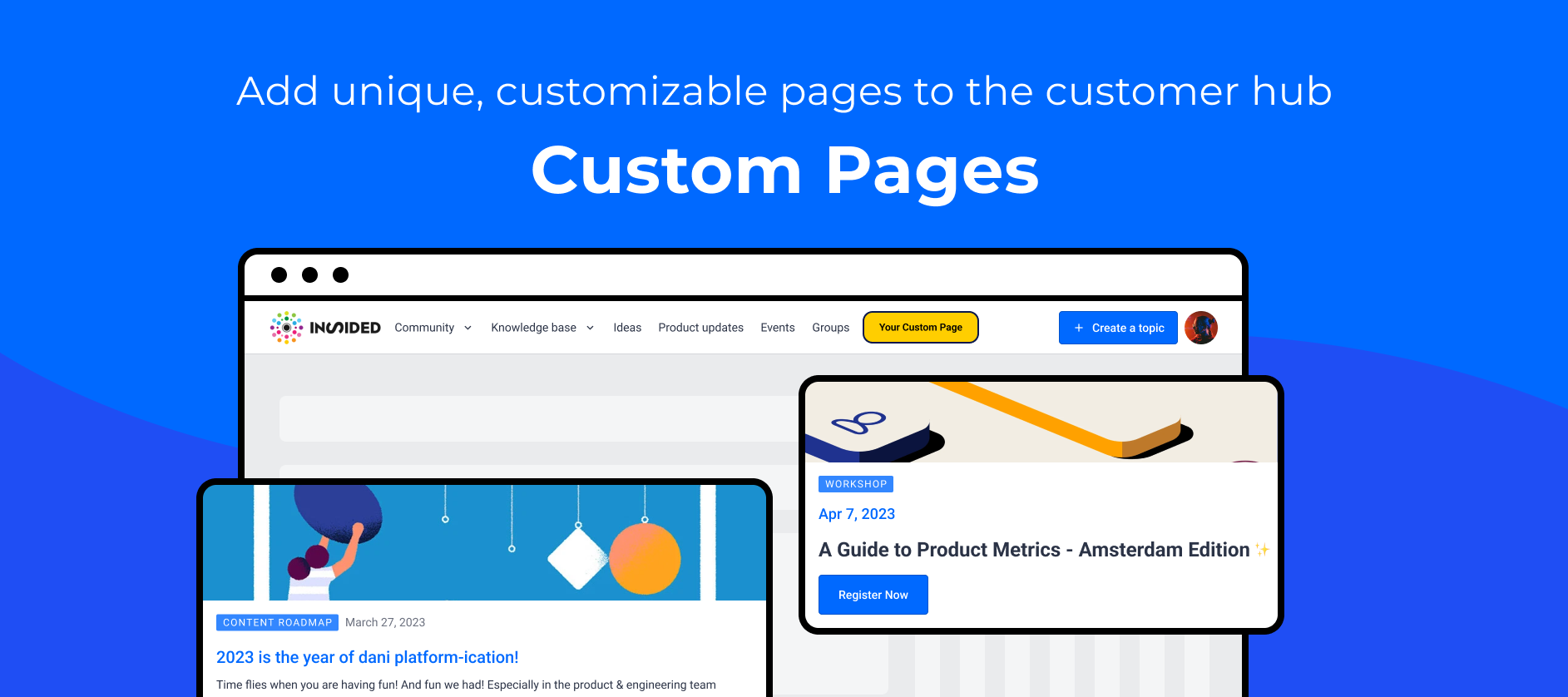
We're excited to launch Custom Pages, allowing you to expand the customer hub beyond the existing modules. Custom pages are standalone, blank, and fully customizable pages that can be linked to from anywhere using a unique URL. The need for greater flexibilityDo you use multiple platforms to ensure your users get the most out of your product? Then you understand how difficult it can be for your users to access information scattered across multiple resources. We provide modules such as Q&A, knowledge base, events, groups, ideation, and product updates to ensure that your customers can find most of the information they require in a single location. At the same time, we recognize the need to incorporate additional information that does not fit in the existing modules but is still very relevant to your customers.Read this article to learn how to get started with Custom Pages. How our customers are using Custom PagesCustom pages are designed to be used for various purposes, such as persona-specific pages, product-specific landing pages, event promotion, an onboarding guide, and more.  inSpired Persona Specific PagesCustom pages can be used to create dedicated pages for personas targeted by your product. You can personalise the hub experience by directing your personas to these pages, where users can easily and quickly find all persona-specific related information, reducing time to value for your customers.We created two persona pages highlighting the value proposition and relevant content for each persona: Product Managers and Community Managers. Product Manager Community Manager Ticket deflection  Here are a few inspiring examples of custom pages created by our customers:VisioneersTV by GongGong conducted a series of interviews with their customers to learn more about how they use Gong. A custom page is used to showcase and share these interviews on the customer hub. Product Roadmap by CircleBlackCircleBlack, an enterprise software platform for financial advisors, has created a custom page to communicate their product roadmap so that their customers can stay up to date on what has been released, what is on the way, and what is in the backlog.  We’d love to hear from you!Do you have any questions or comments about the custom pages? Add them below! We’re always open to new ideas. How do you plan on using Custom Pages? What would make Custom Pages even more powerful? Care to share a link to a Custom Page for inspiration? 

Integrations Galore!

Integrations Galore!

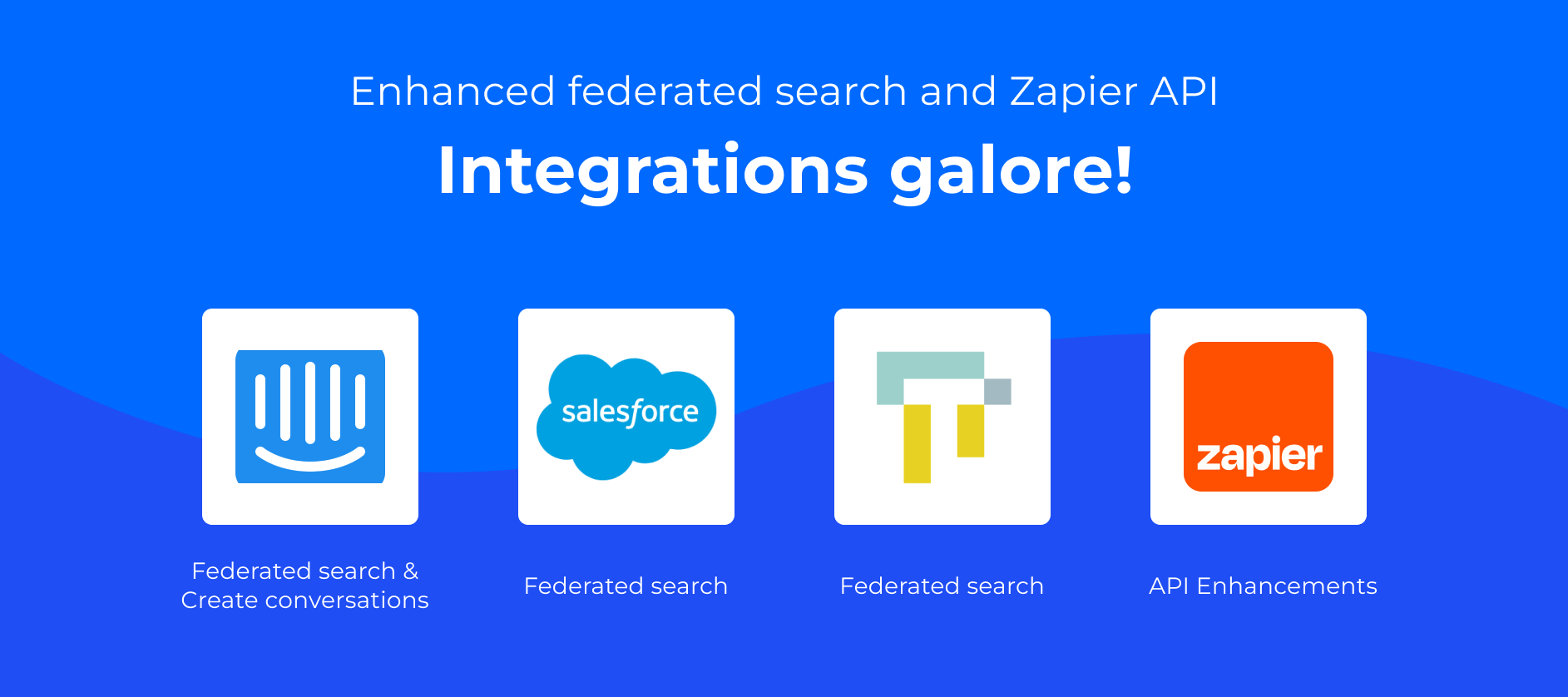
 The true magic of inSided stems from our powerful integrations. Leveraging these key connections, you can create a customer hub that centralizes all of your customer resources in one place, making it easy for your users to find everything they need.  This is why we are excited to announce that we’ve built multiple new integrations and made some essential enhancements that will enable you to take your customer hub to the next level. What’s New? Intercom IntegrationThe new native Intercom integration has two main capabilities. Using Federated Search, your customers can seamlessly search for Intercom Help Center content right from your inSided hub. Using the new Create an Intercom Conversation button, you can quickly escalate inSided community posts to Intercom conversations. This will help your customers receive quicker one-on-one help, streamline your support workflows, and improve cross-functional collaboration between your customer-facing teams. For more information on enabling these integrations, check out these articles: Intercom: Federated Search Intercom: Create an Intercom Conversation  Thought Industries Federated SearchOur new Federated Search integration for Thought Industries allows your community members to simultaneously search through your community content and your Thought Industries courses, providing a single place to access all of your educational and support information. To set up Federated Search for Thought Industries, follow these steps.  Salesforce Federated Search EnhancementsWe’ve updated the Federated Search capabilities with Salesforce. You can now pull in the knowledge content that you publish on your custom domain using Salesforce cloud experiences. This also allows you to aggregate content that is gated behind a login wall in your customer hub, for example, the content that you enabled only for specific groups of users on your SFDC customer or partner channels. For details on how to use new setup options, follow the steps in this article.  Zapier Integration EnhancementsOur Zapier integration enables you to securely trigger workflows based on community activities and connect other apps to trigger behaviors on inSided. With this enhancement, you no longer longer need to store API credentials in Zapier in order to use the API, making it immensely safer and more secure.  The enhancements also provide extended functionality because you are not limited by the inbuilt Zapier events. For example, you can push poll results into your analytics platform or you can automatically sync and update user profile information with your entire software ecosystem. The possibilities are endless! Need some inspiration? Check out a few of our templates and use case examples. Follow this article for help setting up the Zapier integration. We’d love to hear from you!Do you have any questions or comments about our integrations? Are you thinking of really neat ways to use this new Zapier integration? We’d love to hear all about it! Add a comment below.

Related products:CC Integrations
Roadmap Update 27

Roadmap Update 27

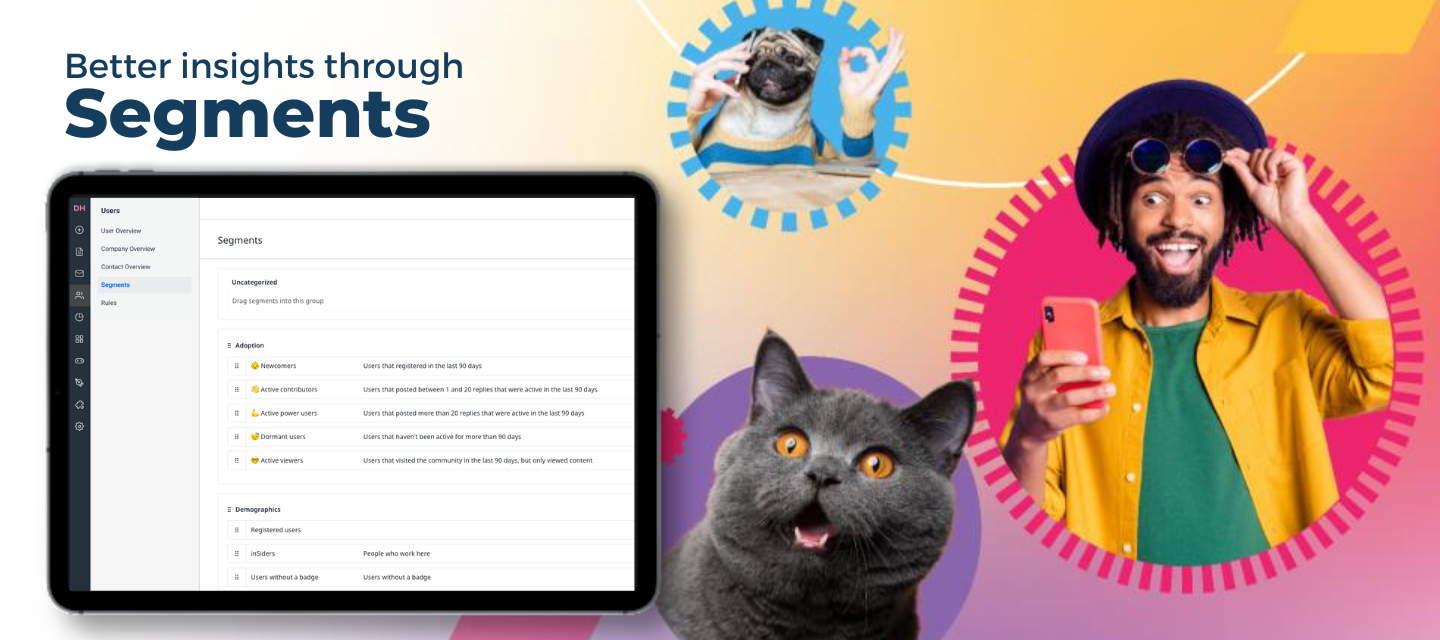
Table of Contents:Taking the lead from House of Pain, feel free to jump around!Recently Released Customization Moderation & User Management Engagement Tools Integrations Hi everyone!Welcome to the first roadmap update of the new fiscal year! We’re taking a moment to celebrate everything we achieved last year, reset goals, and brainstorm ways to improve. One constant bright spot through all of these discussions is YOU - our amazing customers! Thank you for your collaboration, ideas, feedback, and support! We hope that our roadmap continues to be a reflection of everything you need to run engaging and growing communities.Before we dive into the roadmap, let’s take a look at some of the features and enhancements we released since our last update. Recently Released ​​​​​​New Feature: Community Overview PageThe brand new Community Overview page makes your community easier to navigate and engage with while freeing up your homepage to be a true hub for your customers. Enabling the Community Overview Page allows you to have both a homepage that acts as a launch pad for your users, as well as a captivating Community Overview page to easily browse community content.New Feature: The Hub HomepageTurn your community into a customer hub using the Homepage! The Homepage centralizes your customer resources and provides a single success destination for your users to improve the customer experience and increase engagement. New Dashboard: Q&A DashboardGain a clear picture of community/Q&A engagement with the new Q&A Dashboard, formally known as the Success Dashboard. This new dashboard focuses solely on the Community/Q&A module, ensuring that the most relevant Q&A metrics are surfaced in the same dashboard. With this dashboard, you can see the number of questions asked and answered and high-level metrics including average response time. We’ve already made a few enhancements since the launch of the new dashboard - for detailed information, check out this Product Update.​​​​​​New Integration: Gainsight PX Knowledge Center Bot ConnectioninSided and Gainsight PX customers can now make content more accessible and seamless by adding searchable articles, such as FAQs and best practices, directly into your in-app knowledge center bot. Maximize the impact of your community by augmenting existing in-app content with community articles to create more powerful user experiences, instantly connect your users to each other, and provide a space for them to respond and ask deeper questions about your product.Enhancement: Thought Industries Content FilteringWe added new capabilities to our integration with Thought Industries that enables moderators and administrators to filter the content that is pulled into your inSided community. Using the new custom query, you can now filter content from directly within your community, which provides additional control and flexibility.Now let’s dive into what we are working on next! Customization Custom PagesStatus: Closed BetaFlexibility and customization are key to building successful customer communities that support your company. Every community will look different, feel different, and have different requirements which is why we’re building Custom Pages. Custom Pages will allow you to create the dedicated landing experiences you need for your business. For example, persona-specific landing pages or promotional pages for large events.Dynamic Content WidgetStatus: Closed BetaThe dynamic content widget allows community managers to dynamically display relevant content throughout their community. Easily promote your newest content piece or surface hot topics and discussions using content filters and sorting options. Leverage the widget to bring your content to life and boost engagement and interaction across your customer hub. Custom Drop-Down MenusStatus: CandidateThe custom drop-down menu feature allows community managers to change the configuration of the drop-down menu (mega-menu) as per their own requirements. This will serve as an extension to custom pages, giving customers the ability to add custom pages in the header or drop-down.Moderation & User Management Create and save user segmentsStatus: Open BetaThe Segments feature allows you to apply filters on the User overview to identify groups of interest and save them as a segment. The Segments feature helps you to get better insights into how your community population is distributed among your segments (eg. power users), as well as show areas for improvement (eg. users that haven’t joined groups). Soon you’ll also be able to use segments as a way to automate email campaigns and create personalized journeys. To opt into the open beta, go to Control → Settings → Experimental Features.Engagement Tools One-off and Automated Email CampaignsStatus: Closed BetaWe’re currently working hard on our new Email Campaigns feature to both expand its use cases (to allow for automated targeted emails), as well as move it into an open beta phase for broader access. This feature will give you the tools to better engage with your community members (eg. send community digests, promote events, etc.) as well as set up onboarding flows and reactivation campaigns.Use segments in email campaignsStatus: Technical DesignApart from the filters we currently offer to build an audience in Email Campaigns (role, last activity, registration date), we’ll also allow you to address the segments you’ve created in the Segments page as a way to set up automated email campaigns. For instance, you can automatically reach out to your new users that haven’t joined a group within 30 days of joining, to try to increase group adoption.Updates to Event creation and managementStatus: DevelopmentAs events take an increasingly larger role in your community and CS strategy, so grows the need to offer a more robust and scalable Events solution. That’s why we’ll be making event creation and management a lot smoother and more efficient, by allowing you to save events as a draft, schedule them in the future, preview events, and duplicate events.Improved Destination experience for EventsStatus: Technical DesignWe’ll be bringing customization mode to Events, so you can customize this page with additional widgets, callouts, banners, etc. We’ll also bring the Events overview more in line with the Product Updates overview by adding filtering options and pagination. Integrations Gainsight CS + inSided ConnectorStatus: DevelopmentLeveraging a seamless connector between Gainsight CS and inSided, you’ll be able to surface valuable community metrics directly into the Gainsight C360 dashboard. This data can be used to influence health scores, identify at-risk accounts, gauge product sentiment, and collect real-time feedback from end users.Integrations with Intercom Status: DevelopmentOur new integration with Intercom is coming very soon! There are two main components to this integration.  Federated Search: With federated search, your customers can seamlessly search for Intercom Help Center content right from your inSided hub. Create conversation in Intercom: Easily escalate inSided community posts to Intercom conversations to help customers receive quicker one-on-one help. Connect inSided and Intercom to streamline your support workflows and improve cross-functional collaboration between your customer-facing teams. Updated Federated Search Integration with SalesforceStatus: DevelopmentWe are updating our federated search capabilities with Salesforce to pull in knowledge base articles from custom domains. This will enable you to maintain their knowledge base article structure and display through Salesforce, and still allow users to find this content directly in your community. What do you think?We are always open to feedback. Let us know what you think in the comments! 

Related products:CC Integrations

Gainsight's January/February 2023 - Q4 Release is LIVE [NXT & SFDC]

Gainsight is excited to announce the addition of a few much-anticipated features and enhancements that will improve Admin and User experience.  NXTThe v6.35 release is live in NXT orgs in the EU as of January 28, and for US customers on February 07. Check out the release notes. Some highlights from the NXT release include:📨 Log Journey Orchestrator Emails as Timeline Activities: CSMs can view all automated emails sent to their customers as Activities in Timeline. These automated emails help CSMs to drive discussions, use as reference and elicit responses from their customers during meetings. Learn more.IMPORTANT: For the emails to be logged as Activities, admins need to select the Log To Timeline checkbox while creating the Journey Orchestrator  program.🗃 Out Of The Box Account Based Forecasting: The new out-of-the box account based forecasting brings Company View to the Renewal Center Forecast. Using this view, the CSMs can now forecast at the account level without owning opportunities. Learn more.IMPORTANT: Admins must toggle on the Show Company View button from the Renewal Center configuration to activate account based forecasting for CSMs.↔ SFDC Bi-Directional Real-Time Sync: Admins can now sync data in real-time from Salesforce to Gainsight for the Account, Contact and Case objects. A maximum of three real-time sync jobs is supported (one job each for the Account, Contact and Case objects). Learn more.👤 Ability to Merge Person Records Manually: Admins can now identify duplicate records in the People model and merge them to get a winning record. Admins can change the winning record or enrich the winning record after reviewing the impact analysis. Learn more___________________________________________________________SFDCFor SFDC customers, the release is live in your production orgs as of February 04. Check out the release notes. Some highlights from the SFDC release include:📨 Log Journey Orchestrator Emails as Timeline Activities: CSMs can view all automated emails sent to their customers as Activities in Timeline. These automated emails help CSMs to drive discussions, use as reference and elicit responses from their customers during meetings. Learn more.IMPORTANT:  For the emails to be logged as Activities, admins need to select the Log To Timeline checkbox while creating the Journey Orchestrator program.🗃 Out Of The Box Account Based Forecasting: The new out-of-the box account based forecasting brings Company View to the Renewal Center Forecast. Using this view, the CSMs can now forecast at the account level without owning opportunities. Refer to Configure Account Based Forecasting (Company View) and Account Based Forecasting (Company View) for CSMs articles to learn more.IMPORTANT: Admins must toggle on the Show Company View button from the Renewal Center configuration page to activate account based forecasting for CSMs.➕ Enhanced Formula Field in Reporting: Gainsight has enhanced the reporting capabilities by introducing three new functions in Formula fields. The new functions added are Sum, Average, and Count. Learn more.IMPORTANT: You need to select the Percentage option from the Data Type dropdown, while creating the Formula field. 🔌 Email Assist 2.0 Support for Chrome Plug-in and Outlook Add-in: Email Assist 2.0 features are now supported in the Chrome Plug-in and Outlook Add-in. With this release, the following enhancements are added to support the plug-ins: Folder Structure and Template Versions. Refer to Gainsight Assist Chrome Plug-In and Gainsight Assist Outlook Add-In articles to learn more.IMPORTANT: The Email Assist 2.0 support will be available on February 11, 2023.  Follow this post and/or subscribe to this category to automatically receive updates when new content/document/communication is posted.*** FYI @andutta  @minh_phan @neelam_mukherjee @Divya  Training & Certification

Related products:CS Journey Orchestrator

📢 Gainsight's PX February 2023 Release is Live!

The PX February release is now live in US and EU orgs!  We have delivered new features and enhancements to help you get started faster and simplify your PX user experience. Check out our release notes for more information.Release Highlights:New Dashboard and Widget Experience: Reach more valuable insights with a new, intuitive, and easy to use dashboard and widget experience. Use newly categorized widgets and dashboard templates to create meaningful and granular dashboards quickly. Choose chart type, time period frequency,  and other parameters at once for a seamless user experience.  Add inSided Community Content in Your KC Bot: Take your Knowledge Center Bot to the next level by syncing content directly from your Community platform. For customers of inSided, you can now fetch ideas, questions, discussions, and articles from your inSided subscription and display them directly in the KC Bot for users to engage with. New Actions on Custom Buttons in Guide Editor: To automate more prescriptive in-app user journeys, you can now use Custom Buttons in the new Editor to automatically open a KC Bot, open an article created in PX directly on the Bot, or even navigate within a Guide - no code required.  Engagement Monitoring and Checksum Validation: You can now identify a wider spectrum of validations such as checksum, invalid HTML tags, and restricted HTML reference domains in Engagement Monitoring. Improve error monitoring with real time validation on active engagements for checksum and HTML errors.  New and Enhanced APIs: We’ve enhanced Gainsight’s APIs with new PX Admin and Engagement monitoring APIs for customer alert systems, as well as enhanced APIs to support Localization in KC Bot and Articles. Cookie-Free Tracking in PX: You can now define cookie storage locations during PX installation, choosing from browser or local storage options for increased privacy configurations. ++------------------------------------------------------------------------++RELEASE NOTES++------------------------------------------------------------------------++FYI @mickey @karl_rumelhart @dstokowski  @minh_phan @MatthewWasley @robert_lakin @Tori Jeffcoat @harshibanka @Umakanth @dileepnalla @kathleenkenny23 @link_black  @skalle @Chandu @aharkut  @anirbandutta @neelam_mukherjee @ecohen @gmichlin @Jared LeesFollow this post and/or subscribe to this category to automatically receive updates when new content/document/communication is posted.

Related products:PX In-App Hub (formerly KC Bot)
Introducing the Homepage

Introducing the Homepage

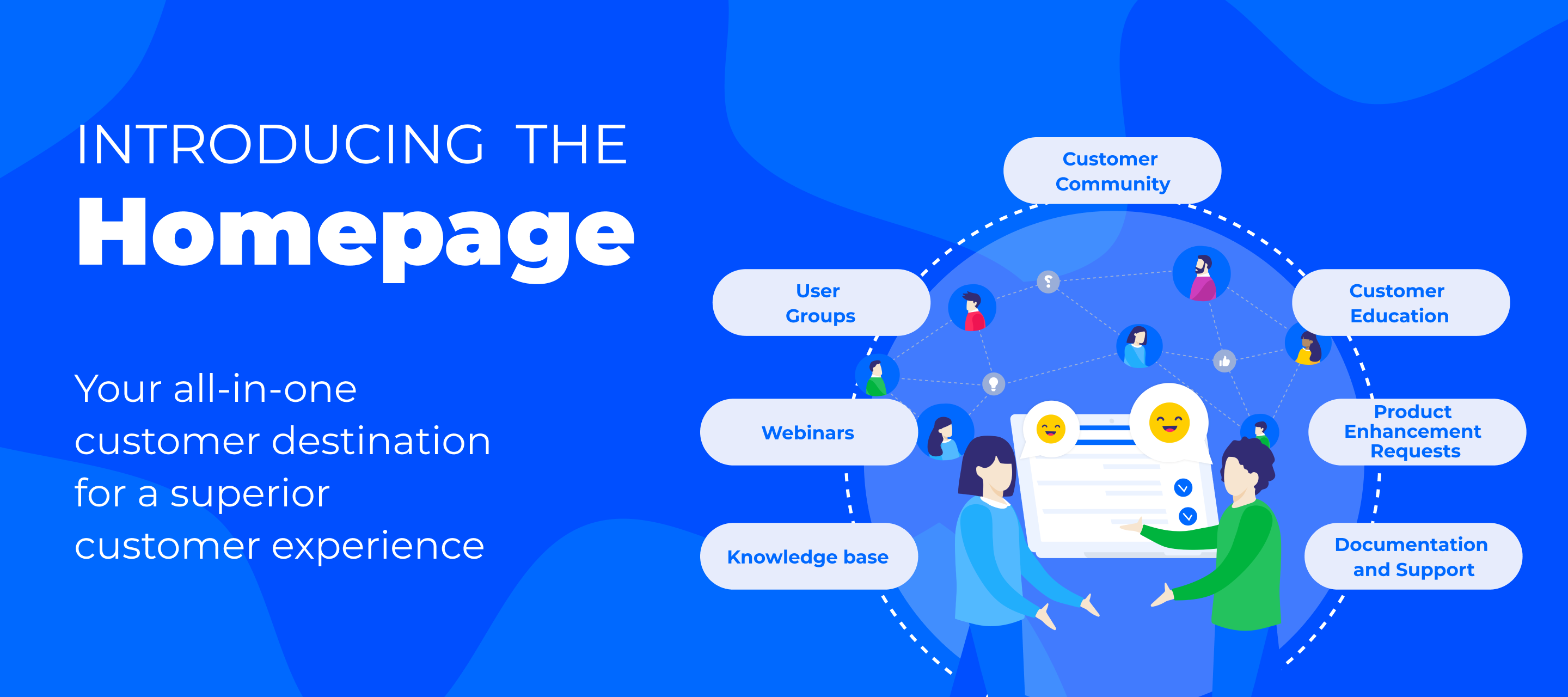
The traditional customer journey is fractured. Resources are scattered across multiple tools, created by various teams, and shared through disconnected channels leaving customers frustrated and unable to find the answers they need. That’s the problem we aim to solve by allowing our customers to build a true customer hub.More and more of our customers are turning their community into a customer hub using the new Homepage, which brings all customer success resources together and offers their users a single destination for all relevant content. However, we learned that building a page that functions both as a dedicated customer hub homepage, as well as an engaging community overview page, can be a challenge. Therefore, we introduced the dedicated Community Overview page in beta last year. Enabling this page allows you to have both a homepage that acts as a launch pad for your users, as well as an engaging Community Overview page to easily browse community content. After iterating on our customization mode and widget offering to build a better Homepage (eg. by introducing the Widget Library and the new Banner Widget), we’re ready to launch this feature into general availability! How our customers are building their HomepagesBefore we dive into how you can set this up, let’s have a look at some examples by some of our customers.Gong Gong recently relaunched their community as a customer hub, which they call Visioneers. In doing so, they’ve positioned Visioneers as the central landing page for all customers to improve the customer experience, increase engagement and enable ambassadors.Check out Gong’s hub here MiroMiro’s community is growing beyond community by centralizing more than just community content. By bringing events, product updates, ideas, and even their knowledge base content (using our Federated Search functionality) together, this will enable their users to find their answers from one central location, whether it’s user-generated content or company-created content.  Check it out here. inSpiredWe rebranded our very own inSpired Community to the inSpired Hub in December to showcase the power of using the Homepage as a dedicated launch pad for all of our customer success resources. With a few simple adjustments, we made both our Homepage and Community Overview pages easier to navigate and more intuitive to find the content you’re looking for. Take a look around! Check out our new hub here! Getting startedTo turn on the Community Overview page and free up your Homepage to become a true landing page for your users, follow the steps below. Note: if your instance was created after 2 February 2022, the Community Overview page will already be enabled and no further action is required. Customize the Community Overview page. This page will only be visible for community managers and above until you click “Enable Now”. Enable the Community Overview page by clicking “Enable Now”. This will make it visible to your end users who have access to at least one community category. The Community dropdown menu will now include the Community Overview. Customize your new dedicated Homepage. Check out the examples above.  Check out our knowledge base article for more detailed information on how to best set up the Community Overview page and your Homepage. We’d love to hear from you!Do you have any questions or comments about the Homepage or Community Overview page? Add them below! We’re always open to new ideas. How do you plan on using the Homepage? What would make the Homepage even more powerful? Care to share a link to your Homepage for inspiration?

Related products:CC Product Updates
Enhancements to the Q&A Dashboard

Enhancements to the Q&A Dashboard

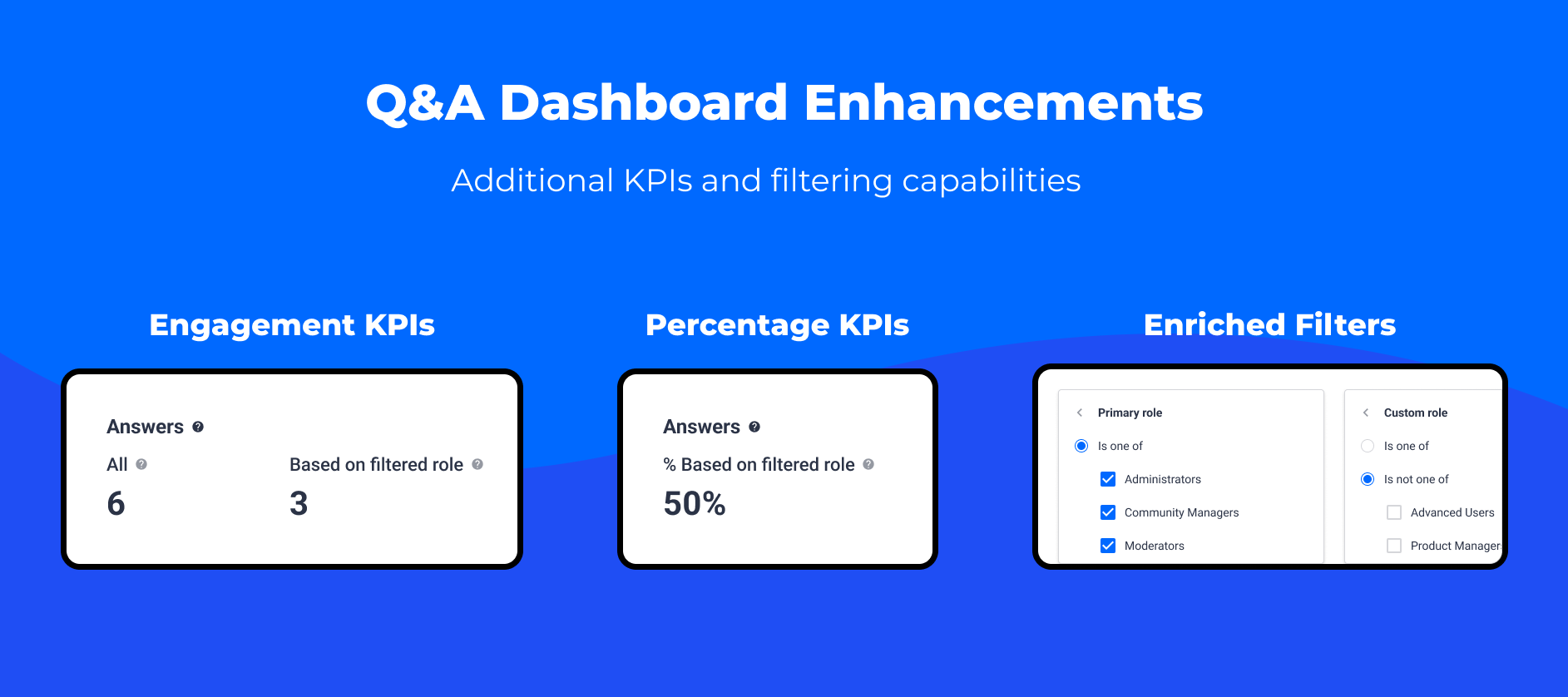
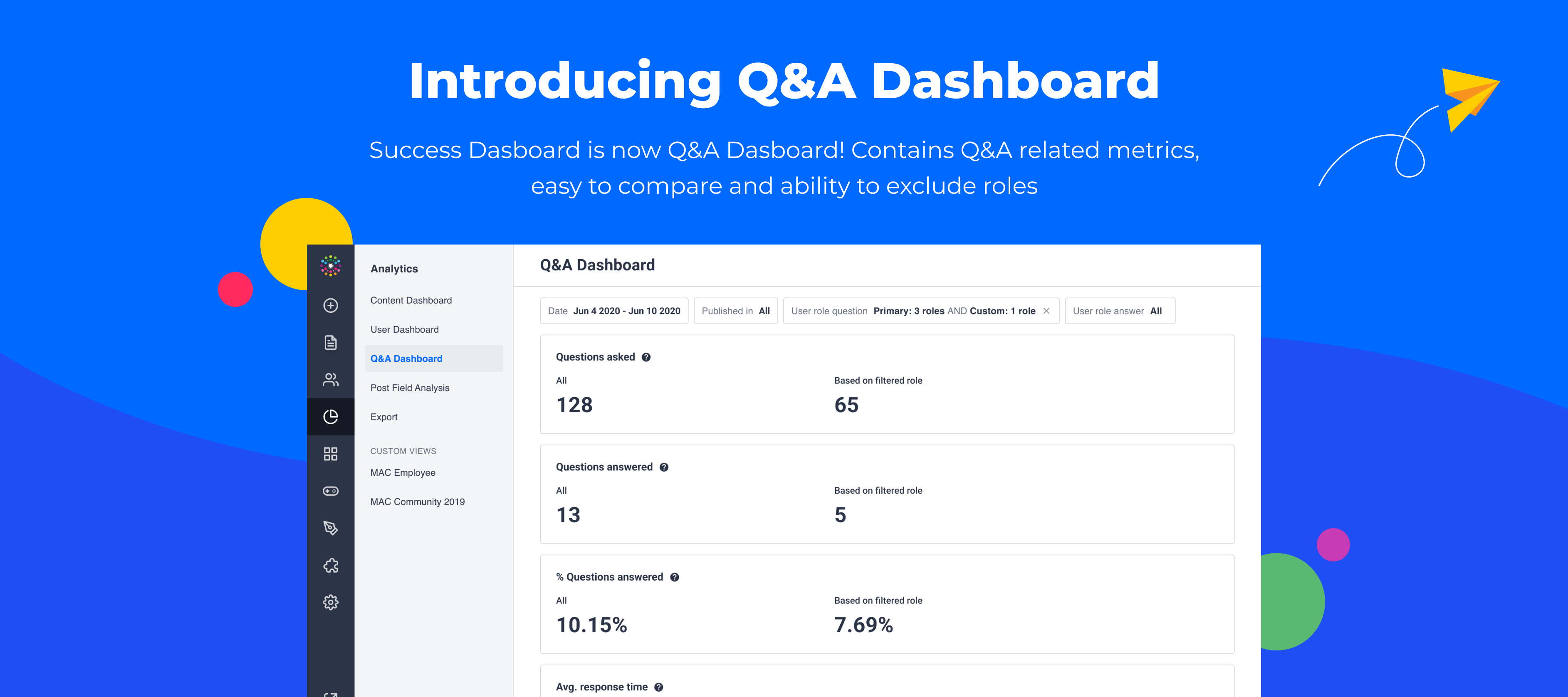
Our goal is to give you the best possible experience with our product and features. We appreciate and are actively listening to all of your feedback. Based on your input, we made a few enhancements to the Q&A Dashboard. These enhancements include: Additional User Engagement KPIs Track user engagement by the number of questions asked and answered in a given timeframe Track user engagement by the number of answers and who was answering Enriched user role filters allowing you to exclude roles New Percentage KPIs Let’s take a closer look at the changes we made. We added a new Answers section to the Q&A dashboard. This section includes 3 KPIs focused on the answers given in your Q&A module. Answers All The “Answer All” KPI shows you how many answers were given in a selected time period. We count all replies posted during that time period, which were afterward marked as best answers. We don’t connect these replies with questions. Answers Based on Filtered Role The “Answers Based on Filtered Role” KPI shows you how many answers were given by users with a specific role selected in the User role answer filter. This enables you to track which users are providing support. You can select from Primary roles and from Custom roles. You also have the ability to exclude roles by using the enhanced user role filters described below.   Answers % Based on Filtered Role  The “Answers % Based on Filter Role” KPI shows you the percentage of answers given by selected roles (User role answer filter) among all Answers given in a selected time period. Drill down using the enhanced filters below to determine user support by custom roles. Formula: Answers Based on Filtered Role / All Answers * 100 Note: If you use the User role answer filter and select Registered User and Super User as the Primary roles you will get the same KPI as % answered by peer in the old Success Dashboard.Next, we enriched the user role filters to enable you to exclude users with a given primary and/or custom role. Each of the user role filters includes the option to filter by Primary role and Custom role using the AND logic between them. Inside each of the user role filters, there are two advanced filtering options: Is one of Is not one of   Finally, we added new question-related percentage KPIs to help you understand and analyze who is asking questions and who is answering them to track support and engagement across your community.  % Questions Asked Based on Filtered Role    The “% questions asked based on filtered role” KPI shows you the percentage of questions asked by selected roles (User role question filter) among all Questions asked in a selected time period.Formula: Questions asked based on filtered role / Questions asked all * 100  % Questions answered based on filtered role  The “% questions answered based on filtered role” KPI shows you the percentage of questions asked by selected roles (User role question) in a selected time period that were answered by users with a selected role (User role answer) among all questions asked in that time that have been answered.Formula: Questions answered based on filtered role / Questions answered all * 100 We’d love to hear your thoughts on the Q&A Dashboard enhancements! As always, if you have any feedback, please add a comment below.

Related products:CC Analytics & Reporting
The New Q&A Dashboard

The New Q&A Dashboard

 We continue to make significant analytic improvements across the platform using valuable feedback and insights from you. Based on a filtering Idea submitted, we’ve re-vamped our Community/Q&A module analytics and are excited to launch the new Q&A Dashboard, formally known as the Success Dashboard.  The Q&A Dashboard now focuses solely on the Community/Q&A module. This ensures that the most relevant Q&A metrics are surfaced in the same dashboard providing a clear picture of community/Q&A engagement. With this dashboard, you can see the number of questions asked and answered and high-level metrics including average response time. Leverage filtering capabilities to hone in on specific datasets based on user role. Let’s dive into the functionality by using the use case provided in the original Idea. Filtering Community Engagement by User Roles As a community manager, you may be interested in learning which users are most effective in answering questions in your community or what percentage of answers given came from your customers. Previously, these answers were a little hidden. With the new filtering capabilities on the Q&A Dashboard, you can now easily filter the data by user roles. There are 4 metrics included on the dashboard: Number of Questions Asked Number of Questions Answered Percentage of Questions Answered Average Response Time   The following filters are available to narrow down the dataset: Date Published In User Role Question (Primary role & Custom role) User Role Answer (Primary role & Custom role)  For more information on how each of these metrics and filters works, please check out this Knowledge Base article. Using our example from above, if you are trying to understand what percentage of answers given on your community came from users with particular custom role, you’ll want to use the User Role Answer filter and select the appropriate role. This allows you to remove employees and partners to show a true participation metric. More options to exclude some roles using filters are coming soon.  We’d love to hear your thoughts on these improvements and how you are using these new filters!

Related products:CC Analytics & Reporting
inSpired ideation review Q3 2022
Roadmap Update 26

Roadmap Update 26

Hi everyone!Can you believe we are halfway through November and quickly heading into the holiday season? Time flies when you’re having fun… and in our case, making a ton of progress! Over the past few months, we’ve released some new features, improved others, and made great strides on our long-term roadmap. We continuously strive to develop great tools that help you build robust communities. Let’s take a quick look at some of the features and enhancements we released since our last update.Click below to skip to upcoming improvementsCustomization Moderation & User Management Engagement Tools Integrations What do you think? New Feature: Banner WidgetCapture your audience's attention and drive engagement with creative banners built directly on inSided. Use the banner widget to create fully-customizable banners that draw your audience in with better display images, larger text, and clear CTAs. Enhancement: Pending OverviewKeeping your communities safe and all posted content relevant and appropriate is extremely important to us. Our new pending overview was redesigned to provide moderators with a complete view of all pending content.  Enhancement: New Filter OperatorsAs we continue to build more filtering capabilities, we also needed to provide advanced filtering operators that allow you to segment by detailed user criteria. For example, you can now find users in specific ways like “Company equals XYZ” or “Questions asked equals 0”. For a full list of operators added, check out this update. ​​​​​​Enhancement: Ideation Voting ImprovementsBased on community feedback, we’ve added some new functionality to the Ideation module to improve the voting experience and to assist in closing the feedback loop. First, when you submit an idea, your vote will automatically be cast for your submission. We now also automatically subscribe users to an idea after they voted for that idea.  Enhancement: New Content Dashboard MetricsDive deeper into content analytics with the addition of the “Single user topics” and “Average response time” KPIs onto the Content Dashboard. We’ve added the ability to filter these KPIs by content type for a full picture of your metrics. For more information on all of these new features and enhancements, check out our Product Updates articles.Filter operators on the User overview A brand new pending overview Banner Widget Voting on an idea automatically subscribes user to idea Automatic vote for own idea Single user topic and Average response time now can be filtered by Content Type Now let’s dive into what we are working on next! Customization Dynamic Content WidgetThe dynamic content widget, currently in closed beta, allows community managers to dynamically display relevant content throughout their community. Easily promote your newest content piece or surface hot topics and discussions using content filters and sorting options. Leverage the widget to bring your content to life and boost engagement and user interactions. Custom PagesFlexibility and customization are key to building successful customer communities that support your company. Every community will look different, feel different, and have different requirements which is why we’re building Custom Pages. Custom Pages will allow you to create the dedicated landing experiences you need for your business. For example, persona-specific landing pages or promotional pages for large events. This feature is currently in development. Interested in learning more? Check out this research article and leave your feedback. We’d love to hear from you! Custom Drop-Down MenusThe custom drop-down menu feature allows community managers to change the configuration of the drop-down menu (mega-menu) as per their requirements. This will serve as an extension to custom pages, giving customers the ability to add custom pages in the header or drop-down. Moderation & User Management Create and save user segmentsCurrently in open beta (opt-in via the Experimental Features page in the Settings category), our upcoming Segments feature allows you to apply filters on the User overview to identify groups of interest and save them as a segment. The Segments feature helps you to get better insights into how your community population is distributed among your segments (eg. power users), as well as show areas for improvement (eg. users that haven’t joined groups). Soon you’ll also be able to use segments as a way to automate email campaigns and create personalized journeys.​​​​​​Apply bulk actions to usersAs you may have seen, we’ve made it possible to assign and remove a user role in bulk from the User overview, which allows you to be a lot more effective in managing your users. To build on top of that, we’ll be offering more bulk actions in the future, such as awarding a badge and sending a private message.  Export to CSVWe’ve updated our filters to make sure you can do all the filtering magic straight on the User overview instead of having to download it and work your magic in Excel or Google Sheets. However, there are use cases for when you want to download a filtered set of users to CSV, to pass them on to marketing for instance, or to supplement another workflow outside of the community. Therefore, we’ll bring the Export to CSV button to the User overview soon! Engagement Tools One-off and Automated Email CampaignsWe’re currently working hard on our new Email Campaigns feature to both expand its use cases (to allow for automated targeted emails), as well as move it into an open beta phase for broader access. This feature will give you the tools to better engage with your community members (eg. send community digests, promote events, etc.) as well as set up onboarding flows and reactivation campaigns.  Use segments in email campaignsApart from the filters we currently offer to build an audience in Email Campaigns (role, last activity, registration date), we’ll also allow you to address the segments you’ve created in the Segments page as a way to set up automated email campaigns. For instance, you can automatically reach out to your new users that haven’t joined a group within 30 days of joining, to try to increase group adoption. Updates to Event creation and managementAs events take an increasingly larger role in your community and CS strategy, so grows the need to offer a more robust and scalable Events solution. That’s why we’ll be making event creation and management a lot smoother and more efficient, by allowing you to save events as a draft, schedule them in the future, preview events, and duplicate events. Improved Destination experience for EventsWe’ll be bringing customization mode to Events, so you can customize this page with additional widgets, callouts, banners, etc. We’ll also bring the Events overview more in line with the Product Updates overview by adding filtering options and pagination.  Attendance tracking for EventsCurrently, for Community RSVP events, we track the RSVPs for your event and allow you to export these to CSV. We’ll also be tracking the number of users that will click on the new “Join Now” button to help you track who, and how many people, actually joined the event. To get even better insights, we’ll also update the CSV to contain more information about your attendees. Integrations Integrations with Gainsight applicationsA top priority for our team is building out a seamless and flexible integration between Gainsight products, including inSided, Gainsight CS, and Gainsight PX. The integration will allow users with multiple Gainsight products to connect their data for a more powerful customer success experience. This includes:Adding community engagement data to Gainsight CS 360 Enhancing customer sentiment analysis with community content data Enriching shared data points to unleash unparalleled customer reporting across products Exposing community content directly in your app Integrations with Intercom We’re working on a new integration with Intercom! With inSided's Intercom integration, you will be able to leverage federated search enabling your customers to seamlessly search content from Intercom Help Center right from your inSided platform.As a next step, we plan to enrich this integration with ticket escalation from the community to Intercom. Improved Thought Industries content filteringWe will continue to add capabilities to our integration with Thought Industries. Coming up, we will add the ability to filter content from within your community using custom fields. Analytics: Success dashboard improvementsAs we improve analytics across the platform, we identified the need for the Success Dashboard to focus on the Community/Q&A module. This will ensure that the most relevant metrics are surfaced in the appropriate dashboard. With the upcoming changes, you’ll have more information and filtering options for authors, including filtering by user role of both the author of the question and the author of the best answer. Product feedback table improvementsMaintaining an easy-to-follow view of product ideas submitted through your community is crucial to effectively managing incoming product requests. It is also important to see how your community is reacting to these ideas. Our upcoming improvements to the Product Feedback Table will provide these insights and make the Ideas module more actionable. We are working on a fully customizable table that will allow you to apply filters to votes, likes, views, authors, status, and more.  What do you think? We are always open to feedback. Let us know what you think in the comments! Keep your eyes peeled for the next Roadmap Update in February. 

Related products:CC Analytics & Reporting
Single user topic and Average response time now can be filtered by Content Type
Filter operators on the User overview

Filter operators on the User overview

As we’re bringing more filtering capabilities to the User overview, so does the need to be more specific in filtering your users. That’s why over the last few weeks, we’ve released some small improvements to the way that filters work on the User overview. Read on to learn all about them.More advanced filtering capabilitiesFor all types of filters (lists, text, date and numbers), we’ve added so-called filter operators. This means that instead of only finding users where a certain condition is true (eg. where Custom Role equals x or y), we’re enabling you to find users in more specific ways (eg. where something is not true, where a field is empty, etc.). Below you’ll find the operators we’ve added:Text filters (eg. Email, First name, Company, etc.) Contains Does not contain Equals Does not equal Starts with Ends with Is empty Is not empty List filters (eg. Custom role, Ranks, Badges, Department, etc.) Is one of Is not one of Is empty Is not empty Number filters (eg. Topics, Replies, etc.) Equals Does not equal Less than More than Between Date filters (eg. Registration date, Last activity, Birthday, etc.) Less than More than Before After On Between Use casesThese filters allow you to drill down on your user base and to find groups of interest. Some examples: Users that are not part of a group yet (Groups ‘is empty’) Users that are not staff (Email ‘does not contain @yourdomain.com) Users that haven’t filled in their basic profile information (First name ‘is empty’ and Last name ‘is empty’) More importantly, these filters will allow you to build better Segments, which is a new feature that’s in open beta now. This feature will allow you to save these filters as a segment which auto-updates automatically, will show segments as a percentage of your user base and allows you to take action on your users through our upcoming bulk actions.You can opt-in for the open beta for the new Segments feature yourself by visiting the Settings > Experimental Features page in Control.

Related products:CC Users & Roles
A brand new pending overview 🌟

A brand new pending overview 🌟

Keeping your communities safe and all posted content relevant and appropriate is extremely important for us. That’s why our platform has different capabilities to check the content before being published, in the form of the spam detection, a content duplication check, option for users to flag and report posts, and automatic content checkers like the keyword blockers. Each of these mechanisms have an associated state assigned to the content piece: spam, flagged, trashed, and pending. Today I’m happy to announce that we have released a new pending overview that not only looks better than the old one, but it has been completely rebuilt to offer your moderating teams more reliability and full cover of all types of content created by community members.  New UI & UX for the pending overview Selection of multiple topics shows available bulk actionsJust like on the old page, you are able to select multiples items from the overview and apply the bulk action you need - you can either trash the topics so they do not show up on the global moderation overview, you can mark them as spam if you think they should have been caught by the spam detection (this always help improve the algorithm), or you can approve them in one click if you think they should become visible for the community users.  Approval flow on the topic moderation pageApprove button available on each post in a threadMaybe before you make them visible, you would like to closely review the entire content and perhaps edit out the more sensitive part of the post. For this, you can easily navigate to the topic moderation page and once the edits are done, you can approve the post right from that page.  Ideas and replies on ideas and product updates are now supported with the pending stateWhen registered users submit an idea or reply on a product update, now this content will be checked against the pre-moderation rules just like the rest of the content types & their replies. This has been a functionality gap that required full refactoring of the way we handle pending content, the way it is being displayed on the pending overview and how it is being approved.  We hope you enjoy this upgrade and if you have any feedback, don’t hesitate to share it with me either in the comments or via email! ( 📨: crotariu@gainsight.com)

Related products:CC Moderation
Banner Widget
inSpired ideation review Q2 2022

inSpired ideation review Q2 2022

While Q3 is already underway and the summer holiday season is close to an end, we’d like to look together at the great things we’ve released in Q2! 🙌This review aims to highlight what has changed on the inSided platform in the last quarter based on the ideas that you have submitted, voted for, and which you contributed to with use cases and needs. Quick stats for inSpired ideas in Q2 2022 6 ideas delivered  79 new ideas created   28 votes delivered  527 votes added A quick reminder of how we, the product team at inSided, work with the ideas posted on the inSpired ideation board. Every 2 weeks we review the newly added ideas and moderate them, meaning we’re changing the status to either open, if the idea is aligned with our vision, or closed, if it is something we don’t see a good fit, we merge duplicate ideas, and reply in the idea threads with questions for additional details, insights and use cases. Every 12 weeks we review our rolling roadmap and adjust it as needed, where the inSpired ideas and additional customer feedback plays a very important role in prioritising roadmap items, and according to our product strategy for the upcoming 12 months. Would you like your community to also make use of customer ideation & feedback but are unsure where to start or how to get your product team involved? I’d be more than happy to connect with you and see how we could help!  As always, we’re deeply grateful to all of you for the valuable insights and taking the time to talk & share feedback with our team! 🙏 Ideas we delivered The following 6 ideas you submitted on inSpired have been delivered, with a total of 28 votes delivered in Q2 2022.  If you’re thinking 6 ideas are not as many as you would have liked or hoped for, we feel you and agree completely! As much as we would love to close lots and lots of votes every quarter, realistically this is not always possible. This Q2 was filled with technical debt payments, preparations for the exciting things announced in our latest roadmap update [do check it out 😉], and much needed alignment & planning for connecting the inSided product with Gainsight’s CS product. 

Roadmap update 25

Roadmap update 25

Hi everyone!As a beautiful (but quite hot) summer comes to a close, I am excited to share this Roadmap Update with you as we head into fall!As we’ve mentioned before, we remain committed to building great tools that enable you to maintain the best-in-class Customer Hub and community experience for your users. We remain focused on our product development goals: Enabling you to transform your community into a unified Customer Hub, to act as single centralized destination for all customer content and engagement Allowing you to optimize the Customer Hub experience through customization of pages and landing pages and personalisation of the user experience by role, or e.g. customer segments that you have defined in your Customer Success CRM Building tools to stimulate engagement by users within your community Introducing features to help you automate community-work, improving user management, moderation and reporting to simplify community administration (and spend less time!) Continuing to improve of the core of our platform and our technology-stack to provide even better reliability, scalability and faster development of new features in the future Continue reading for a more detailed look at all features and improvements that are coming up and for a recap of the recent releases. Coming up Customisation Dynamic content widgetComing soon: the dynamic content widget! This will help you dynamically display content as cards or a list on your community pages, and keep your pages more up-to-date (and active) with less manual action. For instance, you can choose to display the 5 most recent Product Updates in a list, alongside a list with the 5 most recent Ideas. You can read more about it in this research article. Custom pagesThis fall, we’ll enable you to build custom pages on your Customer Hub! For instance, this will allow you to create dedicated landing pages for specific personas, products, or events. These pages can be built using all of the available widgets you’ve come to know, including the new Dynamic Content widget. You can read all about it in this research article. Custom dropdown menusYou will be able to customize your community’s main menu-bar by adding additional items to a dropdown menu. This will enable you to: Add custom pages anywhere in your navigation, making sure they fit the flow you want your community to have Organize links to external resources from anywhere in your navigation, they don’t have to be on the community platform in order to be linked. Use with caution, as we still want to keep it a seamless digital experience :)  Automation Add more filter operatorsTo better find groups of interest among your user base, we have recently released our new filters. The new filters allow you to filter on custom user profile fields. We’re also updating how the filters work by adding filter operators to the current filters (eg. contains, does not contain, is empty, etc.). This will allow you, for instance, to identify all users where the email address “does not contain @insided.com” to filter out employees, or where groups “is empty” to identify users that aren’t part of a group yet. Create and save user segmentsWe will enable you to save segments of users that match certain filter criteria. This will help track your most important user segments (i.e. churned, new users, champions, etc.), as well as keep an eye on groups of interest (eg. users without a badge, users without a group, users with job title x, etc.).Segments will be able to be used as audiences for several existing and future mechanisms: email campaigns, showing or hiding widgets on pages for particular segments, etc. Apply bulk-actions to usersApplying actions to users currently has to be done one by one, and it’s a hassle—we hear you! To make this more efficient, we’ll now offer some basic bulk-actions on the User overview.If you’ve selected one or more users, you’ll be able to perform a bulk-action. Initially, the available bulk-action(s) will be to assign a role, after which we’ll allow awarding a badge and sending a private message. Engagement tools Automated email campaignsAutomated email campaigns offer the ability to automatically onboard, (re)engage or reach out to particular groups of interest (eg. promote an event for all users or specific users). It will be possible to set up sending rules based on the last activity, registration date, role, and group membership.Later, we’ll add the option to automatically address people once they enter a specific segment.If you want to be enrolled in the closed beta for this feature, make sure you sign up for the waitlist in this Product Update. Use segments in email campaignsLater this year, segments created from the user overview will be selectable as an audience for (automated) email campaigns. This will allow for more specific targeting based on all filters (also custom user profile fields) as well as being able to automate actions based on your segments. It will also enable you to create specific onboarding or reactivation flows for different personas in your community. Ideation improvements Disable voting for ideation statusesWe will allow community managers to enable or disable voting by ideation status. It will be possible to disable voting for “Closed” or “Duplicate” statuses. The aim is to prevent frustration of users voting for ideas that are not under consideration. Select multiple product areas in an ‘Idea creation form’Users will be able to select multiple product areas when creating an idea. It will make the categorization of ideas more precise and improve searchability.   Integrations Integrations with Gainsight applicationsWe remain committed to offering the best and the most flexible integration between inSided and all other Gainsight products. Planned improvements are currently: Making integrations very easy and user friendly to set up, nor more hacking or development involvement Enriching shared data points to unleash best-in-class customer reporting, including all the community data available in Gainsight applications, or the other way around Enabling to expose community content directly in your app … and many other awesome features. Improved Thought Industries content filteringWe recently launched integration of our product with the Thought Industries application. Soon, you will be able to filter the content being pulled into the community. It will be possible to write queries filtering the search results: Filter “Published” content by default Use custom fields to filter content  Analytics Success dashboard improvementsWe will introduce more detailed metrics about the authors of the best answers and insight from peer to peer support. The improvements cover: Focus the scope of the dashboard only on Q&A and change the name Split all the metrics to enable filtering them based on the user role of the author of the question as well as the author of the answer Move single user topic metrics to Content Dashboard  Average response time only for Q&A  Content dashboard changesWe will add metrics from the current Success Dashboard:  Single user topic metrics from Success Dashboard to Content Dashboard and enable filtering by all content related filters Average response time related to all content types and enable filtering by all content related filters  Product feedback table ImprovementsWe will provide more detailed view of the ideas submitted and voted in community: Customizable table view Company filer applied to votes, likes, and views Company filter applied to the author of the idea Date creation, current status, and more  Released recently  What do you think? We are really interested in your feedback. Let us know in the comments! Please expect the next Roadmap Update in November.

Related products:CC Analytics & Reporting
Coming soon: Email Campaigns

Coming soon: Email Campaigns

This feature is now in opt-in open beta! You can opt-in from the Experimental features page in Control.Over the past few months, we’ve been hard at work on our new Email Campaigns feature 🎉 Today, we’re excited to open up our beta program to those who’d like to give Email Campaigns a spin! By joining the waiting list, you can sign up for early access to this feature.Email CampaignsThis new Email Campaigns feature allows you to craft compelling emails that you can use for a variety of use cases. For example: Send out a monthly community digest or newsletter to all your users (or a specific segment of users) Create an onboarding flow that sends out emails 7, 14 or 30 days after registration Create re-engagement campaigns to all users that haven’t been active for more than 30 days Encourage users to join a group if they haven’t joined a group in the first 30 days Features: Create emails easily (using our wysiwyg editor you’re used to) Customize the branding of your email campaigns Select recipients based on user properties (eg. role, registration date, last activity, groups) Send a one-off email or make it an automated email (eg. for onboarding or reactivation emails) View email metrics (eg. sent, delivered, opened, clicks, etc.) Why Email Campaigns?We want to offer our customers all the tools to make sure you can build a successful and vibrant community. One part of that is making sure the community experience itself is as engaging as can be (sneak peek: Notification Center coming up), but the other part is making sure that you can keep community members up to date on all the latest and greatest and invite them back to your thriving community. That’s where our new Email Campaigns feature comes into play.Rollout plan Phase 1: Closed beta (gradual)In the first phase, we’ll gradually roll out the feature to customers that have signed up for the waiting list.  Phase 2: Open betaIn the following months, we’ll allow all customers to opt-in for the Email Campaigns feature. You can sign up for the waiting list here. Let us know!What would you like to use the Email Campaigns feature for? What use cases are you most looking forward to addressing? Let us know and inspire others!

Related products:CC Notifications & Subscriptions
Widget Library
Filter on Custom User Profile Fields

Filter on Custom User Profile Fields

While doing discovery on the recently released filters on the User overview, we heard from you that the true insights into your user base lie in the custom User Profile Fields. That’s why we’re happy to announce that starting today, you can filter all your users on the custom User Profile Fields you’ve set up!Filtering optionsYou will now see all of your custom User Profile Fields in the Filter dropdown on the User overview. Depending on the type of filter you’ve set up (text, list or date), the you’ll be able to find users that match a string of text, a list of items or before or after specific dates.Showing columns in the user tableApart from filtering, we’re now enabling you to toggle which custom User Profile Fields you’d like to see in the table. To do so, you can click on Columns and select the ones you’d like to add to the overview. Quick recap: custom User Profile FieldsCustom User Profile Fields are the fields you’ve set up to be either filled in on the registration page, or when users edit their profile. Common use cases for this are:First name Last name Company Department Job title Country Etc.You can read all about setting up those fields in our knowledge base article.What’s next?Being able to find interesting segments of users is one thing, but we want to take it further in the next improvements, which we’ll launch over the next few months: More filter operators Right now, you can only filter users where the conditions are true (for instance, when username contains x, or when role is y). In the upcoming release, we’ll offer more operators to also allow you to find users where a field doesn’t contain your string or selection, or filter out users where a certain profile field is (not) empty. Create and save user segments Being able to filter is one thing, being able to save those filters as a segment is another. This will allow you to quickly open the same filters again, but also to track how many users are in one segment or the other (for instance, see the percentage of New users vs. Champions). Apply bulk actions to users After finding a specific segment of users, you’re likely to want to take an action on them (i.e. assign a role, add to a group, award a badge, etc.). Our new bulk actions will allow you to do just that, and make managing users less time consuming. We’d love to hear from you!Let us know what you think of this improvements, and what other improvements would help you manage your users better.

Related products:CC Users & Roles
Unify all external content with our Federated Search API

Unify all external content with our Federated Search API

At inSided, we believe that unifying all customer success content in one place empowers your customers to be successful and increases self-service rates. To do so, we’ve already built some native integrations to bring content from Zendesk, Freshdesk, Skilljar, Thought Industries and more. On top of that, we’re now opening up our Federated Search API to allow you to bring any external content to your customer hub.What’s new?Using our federated search API you can now push any external content into our search engine and unify the search experience by showing the most relevant results, no matter where it comes from. With the Federated Search API, you can: Push any external content to the inSided search engine Categorize and differentiate external content by source (e.g. Academy, Docs, Help center, Blog) Display external content in the live-search dropdown and search result page Directly navigate to external content from the inSided platform Filter search result pages between community results and external results Note: Federated search via API is a paid add on. Please contact your CSM to start using it.How do I set it up?Learn more about setting up federated search through the API in our Knowledge Base article. This page also links to our API docs, where you’ll learn how to include the title, content, url and source.https://community.insided.com/integrations-124/how-to-show-external-content-in-the-search-results-federated-search-4065 💡 Customer spotlightUnqork, one of our customers who was in the beta for this feature, has set up the Federated Search API so that they pull in courses from their academy, and help articles from their external knowledge base. Want to see it in action? Head over to community.unqork.com! 

Related products:CC Search